Open source · MIT · Works with any coding agent

Know the apartment
before you sign.

Agent playbooks, a Python CLI and a dashboard you own: rank every listing on your own criteria and true monthly cost, time the commute by walking, subway and bus, read the building's records and see the light from inside the exact unit.

Python 3.10+ · free public data · no accounts, servers or API keys

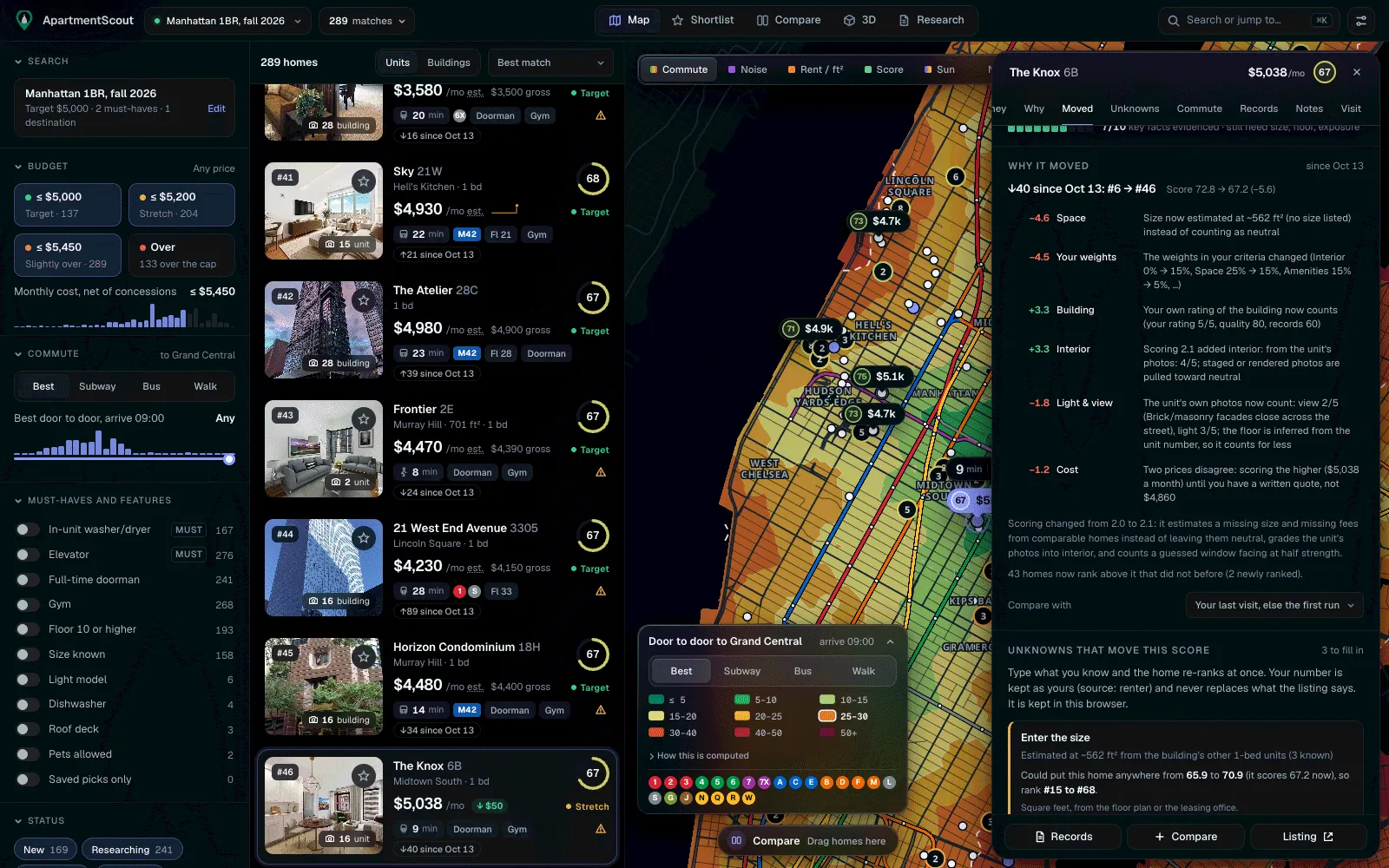
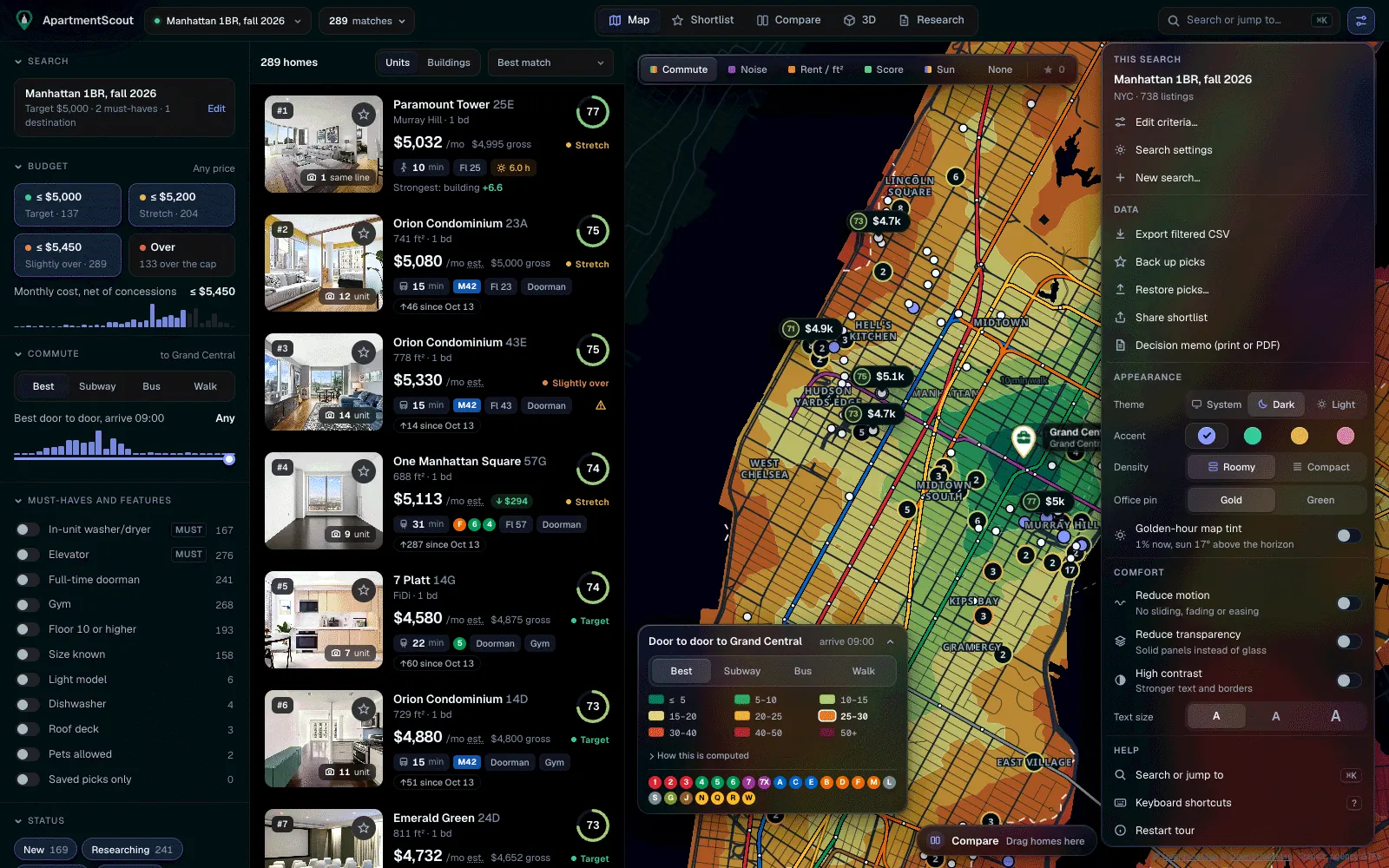
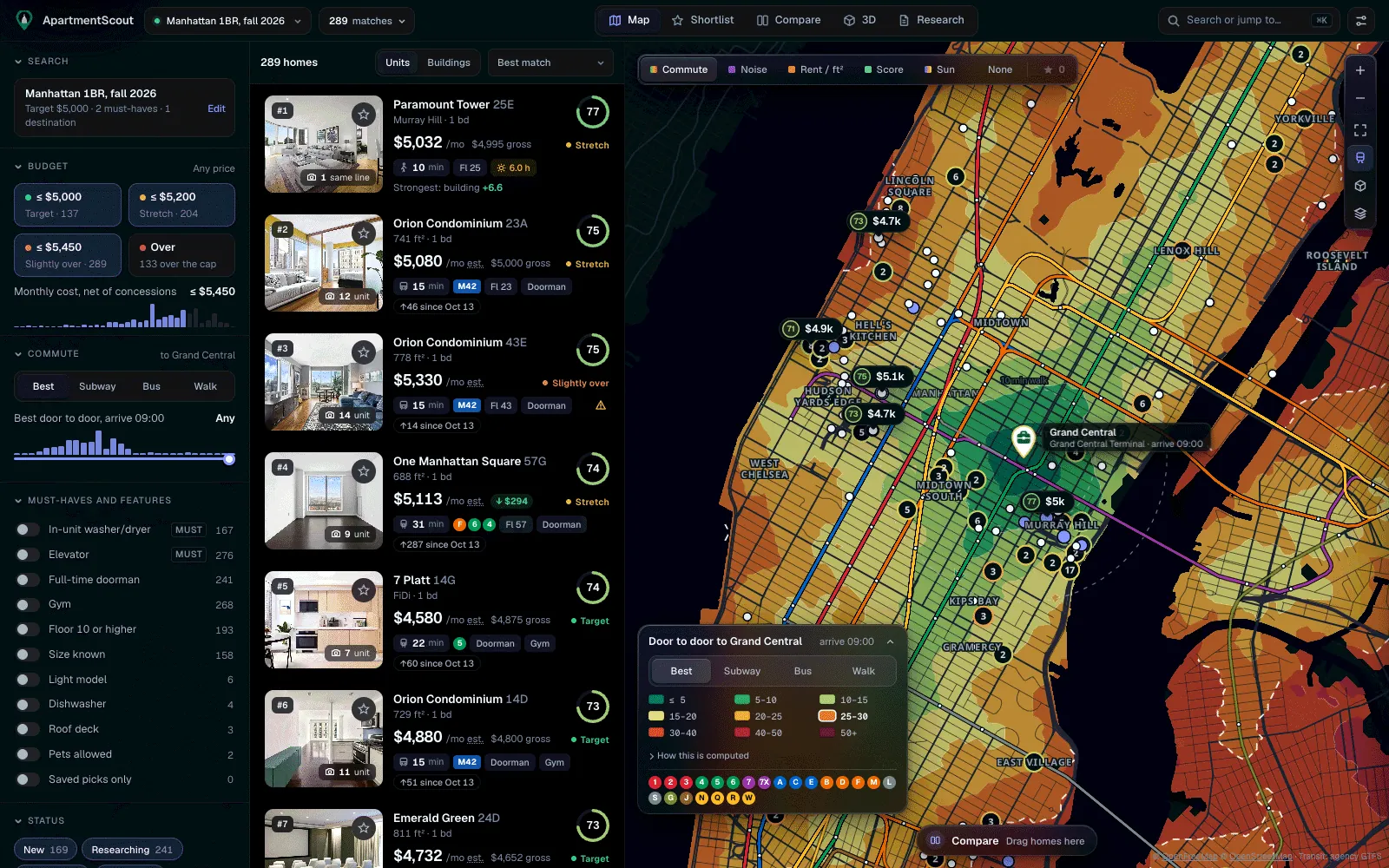
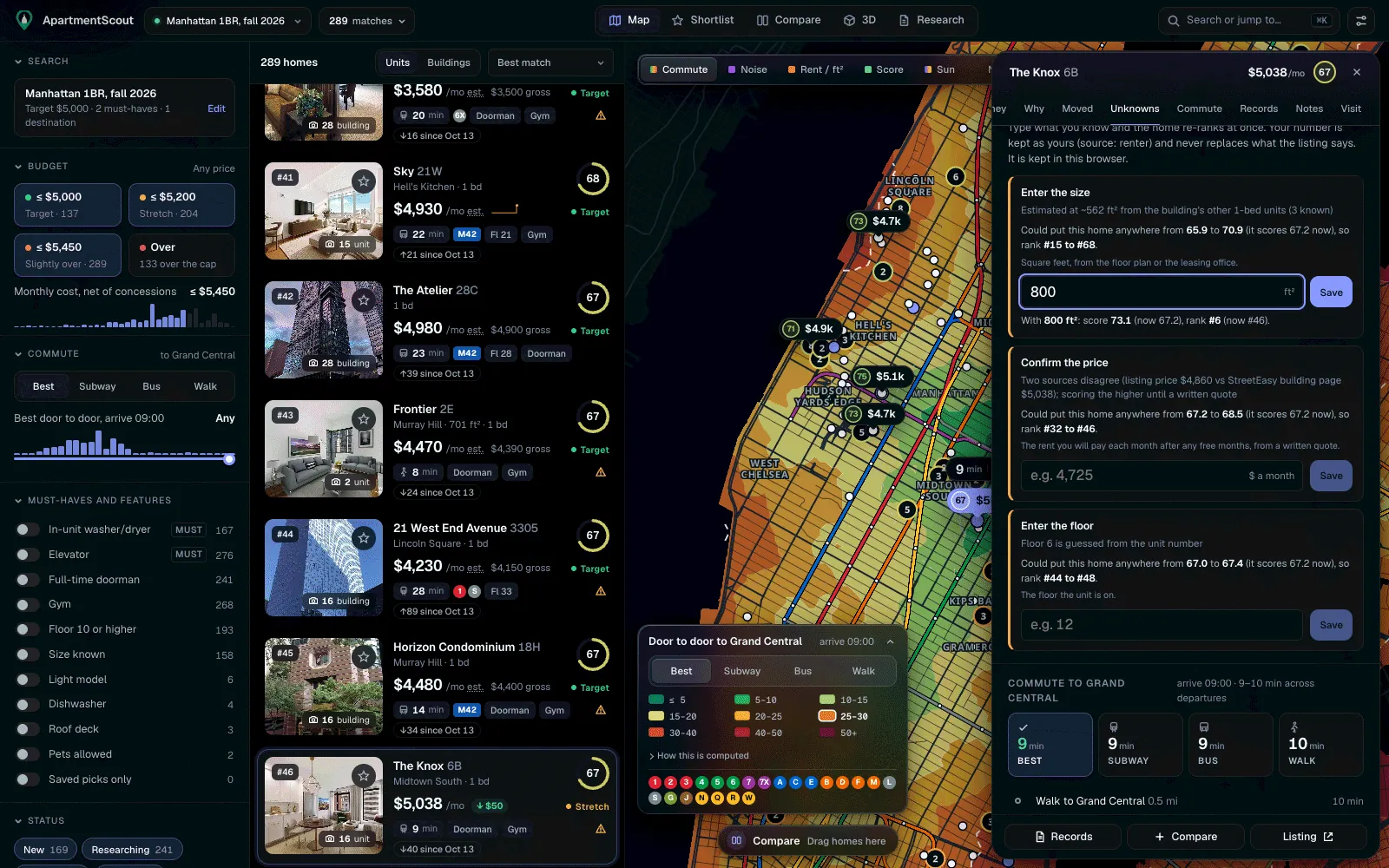
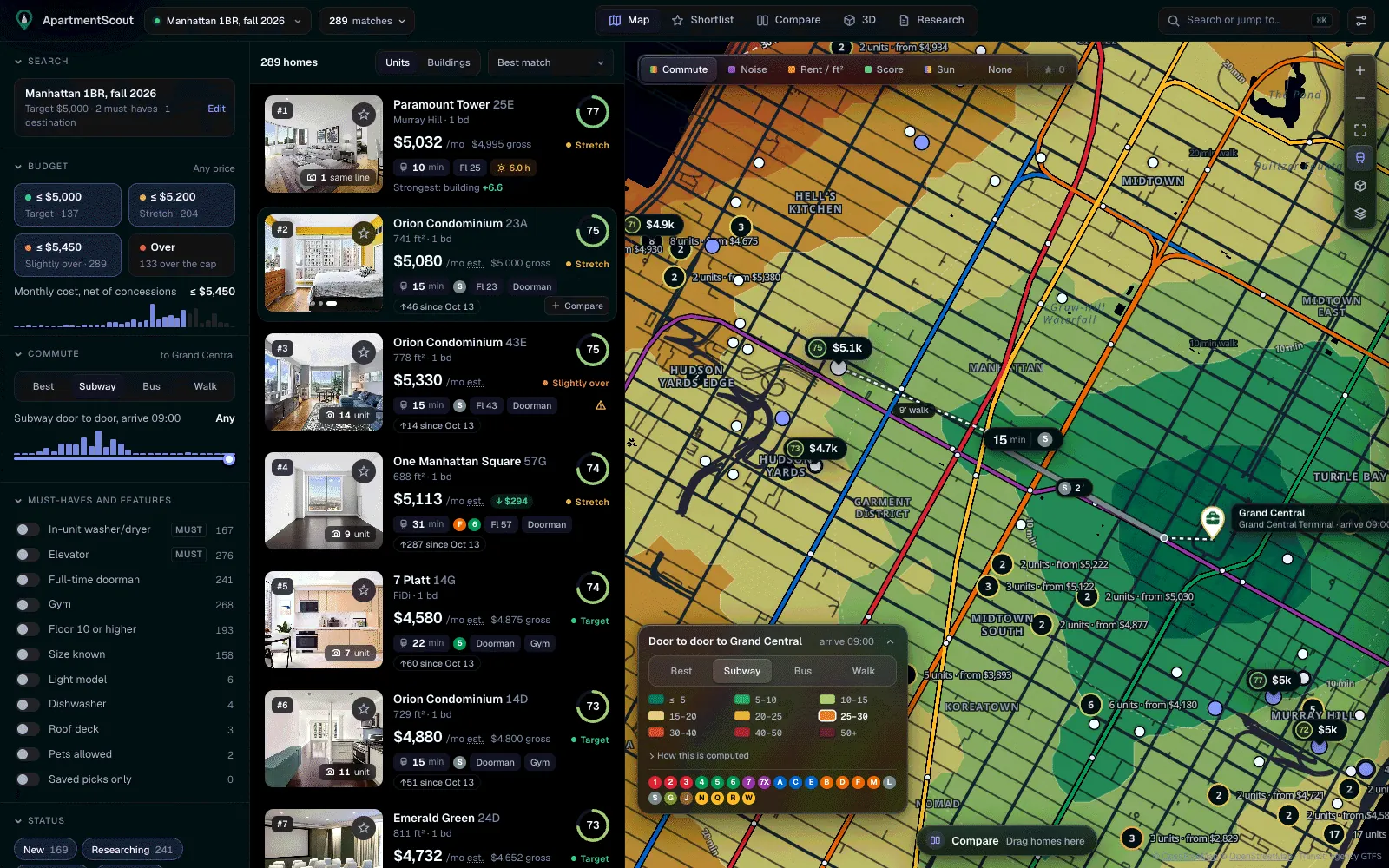
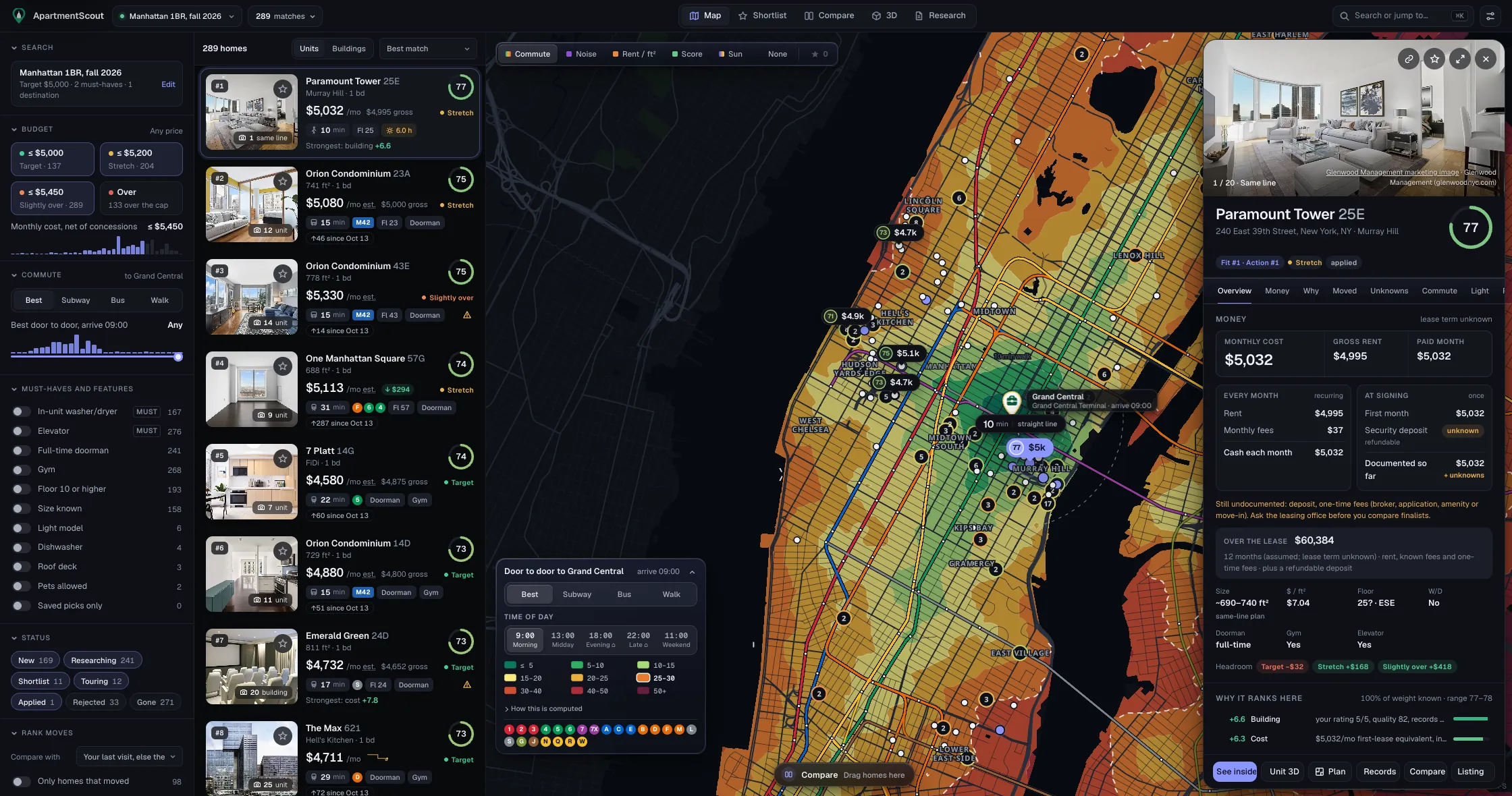
The ApartmentScout dashboard: a dark map of Manhattan with a door-to-door commute heatmap, a ranked list of homes with photos and scores, and one listing open with its monthly cost.
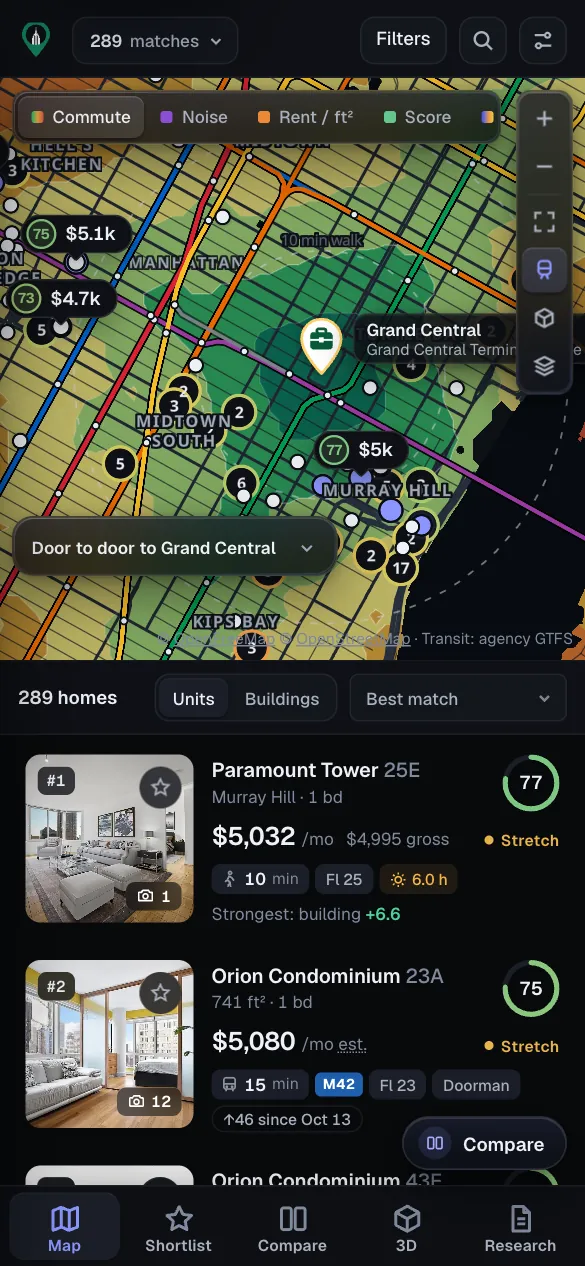
The same search on a phone: the map on top, the ranked listings below and a bottom tab bar.
  • 738listings tracked in the worked example
  • 4commute modes: walk, subway, bus and best of transit
  • <1 minmean commute error against an independent router, 208 buildings
  • 30building dossiers from city records
  • 0API keys, accounts or servers

How it works

An agent, a CLI and a dashboard. All three are yours.

No account, no server and no API key sits between you and your data: everything lives in plain files in a folder.

  1. Your agent does the legwork

    Open the repo in Claude Code, Codex or Cursor. It interviews you, writes criteria.yaml, sources and checks listings, and drafts messages for you to send. Nine playbooks, each ending in a file you can read.

    AGENTS.md .claude/skills/

  2. The CLI turns files into facts

    Each stage is one command over those files: geocode, door-to-door commute by walking, subway and bus, city records, sun and view, then a score on your weights. Repeatable, scriptable and offline once the data is pulled.

    apartmentscout all

  3. The dashboard is where you decide

    Map, Shortlist, Compare, 3D and Research in one page you own, with one menu. Serve it, host it, open it as a single file, or install it as an app that keeps working offline.

    apartmentscout serve

Every stage, step by step

A tour of the demo

Five steps, in the order a search goes.

All of it runs in the live demo on the example search. Nothing to install and nothing to sign up for.

1 · Find

A calmer map, and a reason for every rank.

Zoomed out, nearby homes merge into a bubble that counts them and shows the lowest monthly cost; a building with several homes is one pin with its unit count. Rest the pointer on a pin or a card and the home previews, with its route drawn for the mode you chose. Type a sentence into the command menu and it shows what it understood before anything changes.

  • Plain words: “east of 3rd ave under 5k with w/d”, near a park, or within 25 minutes of work and 30 of a partner
  • “↓40 since Oct 13” on a card opens why it moved, dimension by dimension, in plain sentences
  • A price nobody read off the unit page says so, and a fee nobody confirmed stays unknown
Open the map
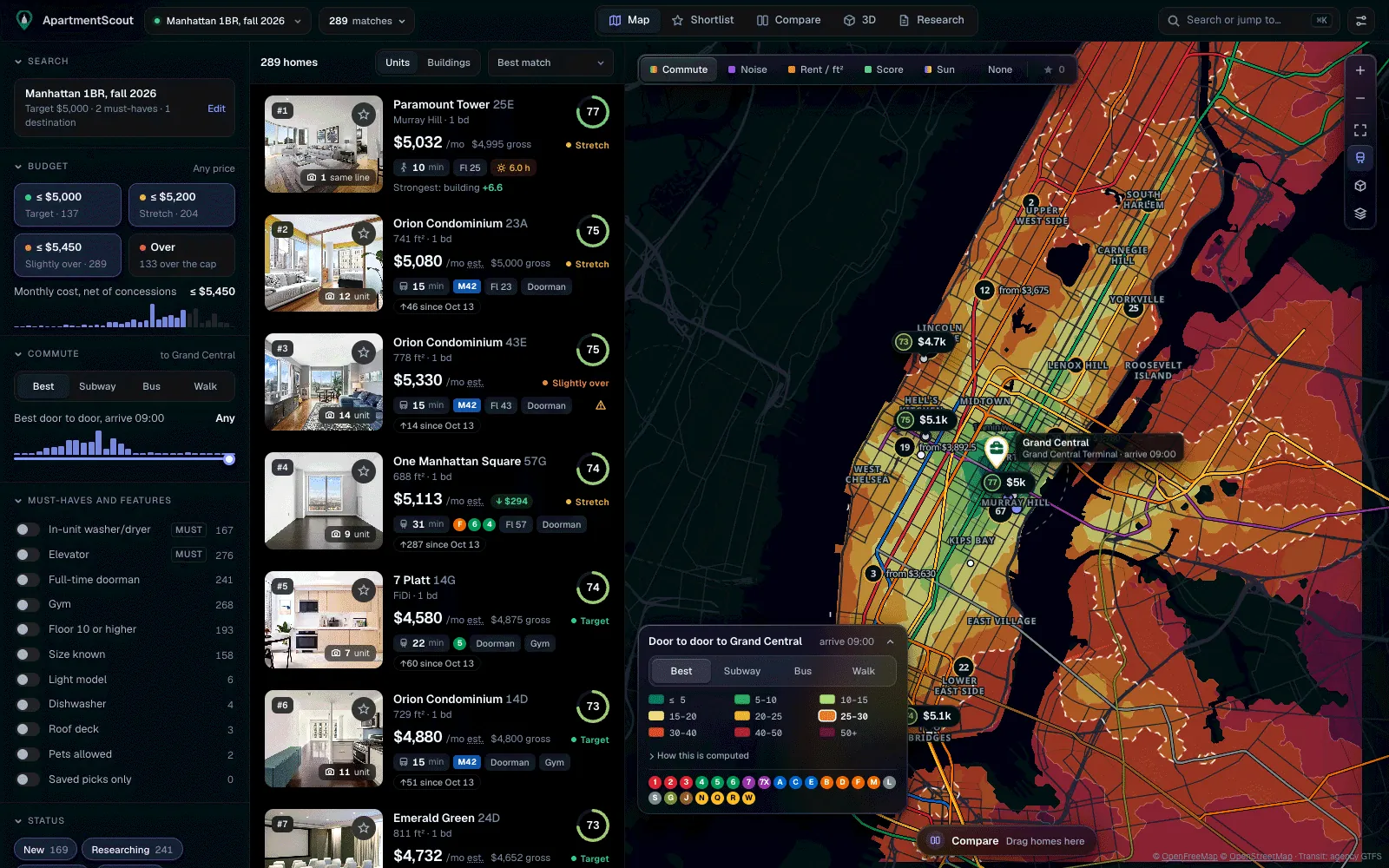
The map zoomed out: nearby homes merged into bubbles that count them and show the lowest monthly cost, over door-to-door commute bands.
A listing's drawer explaining why a home fell 40 places since Oct 13, with the points each change moved.

2 · Compare

From a long list to a short one you can defend.

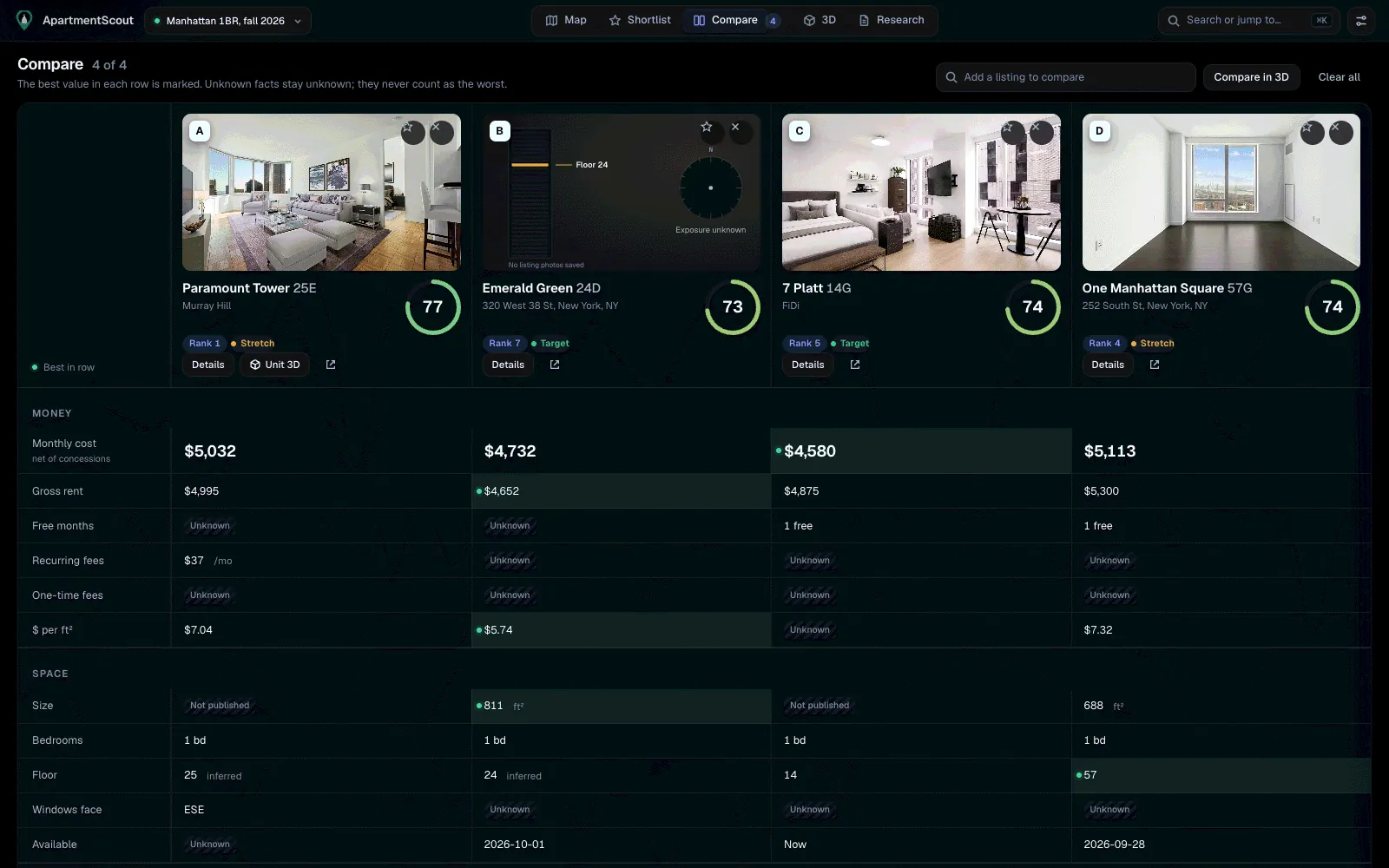
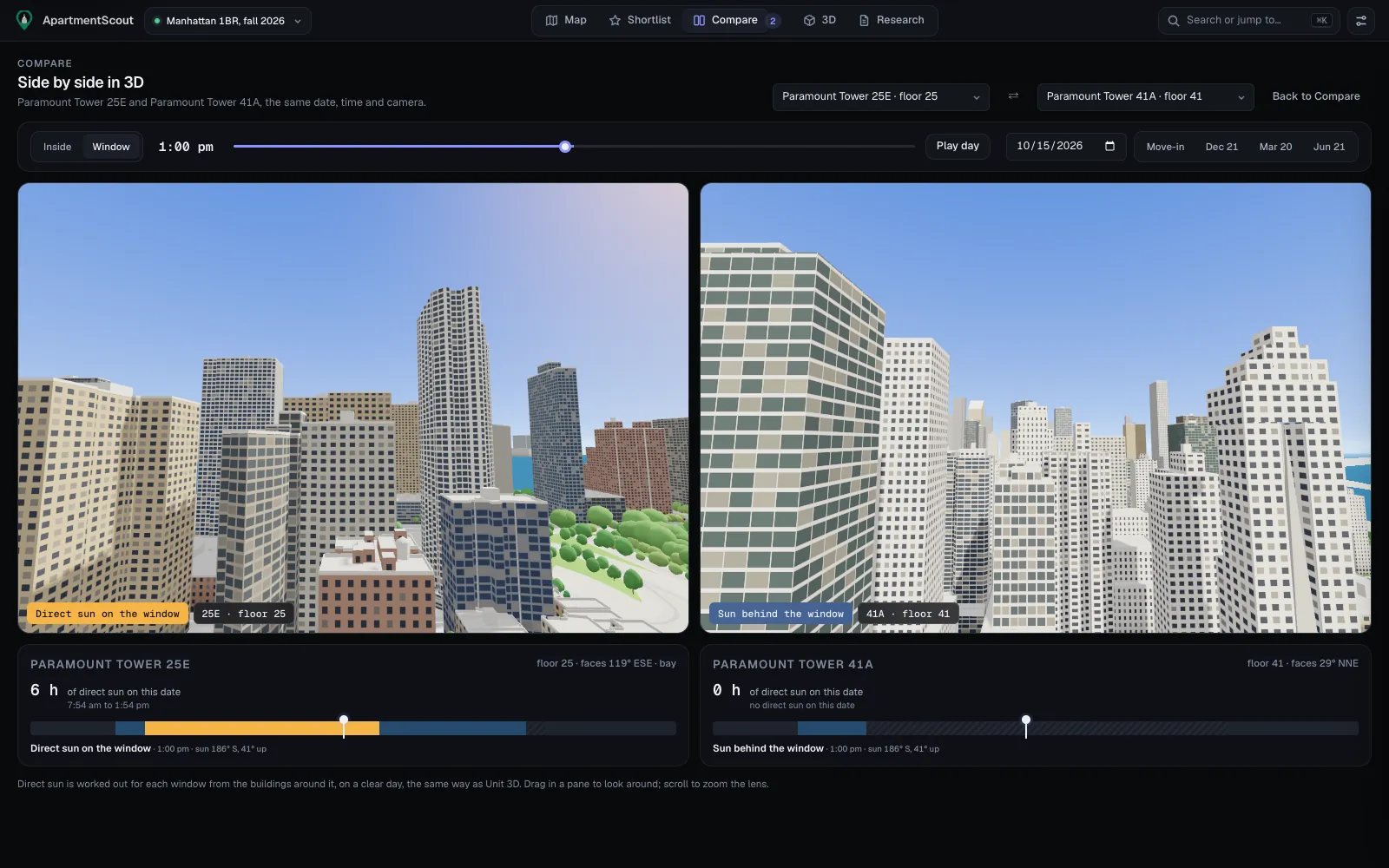
Put up to four finalists side by side on money, space, commute, building, light and score, or open two in 3D with the same date, time and camera. Drag one dot on the trade-off pad to shift weight between cost, commute and space and watch the ranking move. For a home the scorer had to guess, the drawer lists the unknowns that move its score: type the real size or fee and see the rank you would get.

  • The best value in each row is marked; unknowns never count as the worst
  • Two homes in 3D, each with its own direct-sun hours for its window
  • A number you type is kept as yours and never replaces the listing's own facts
Compare finalists
Compare view: four finalists in lettered columns with money and space rows and the best value in each row marked.
Two homes in the same tower side by side in 3D, the 25th floor and the 41st, with direct-sun hours for each window.

3 · See inside

Stand in the apartment before the tour.

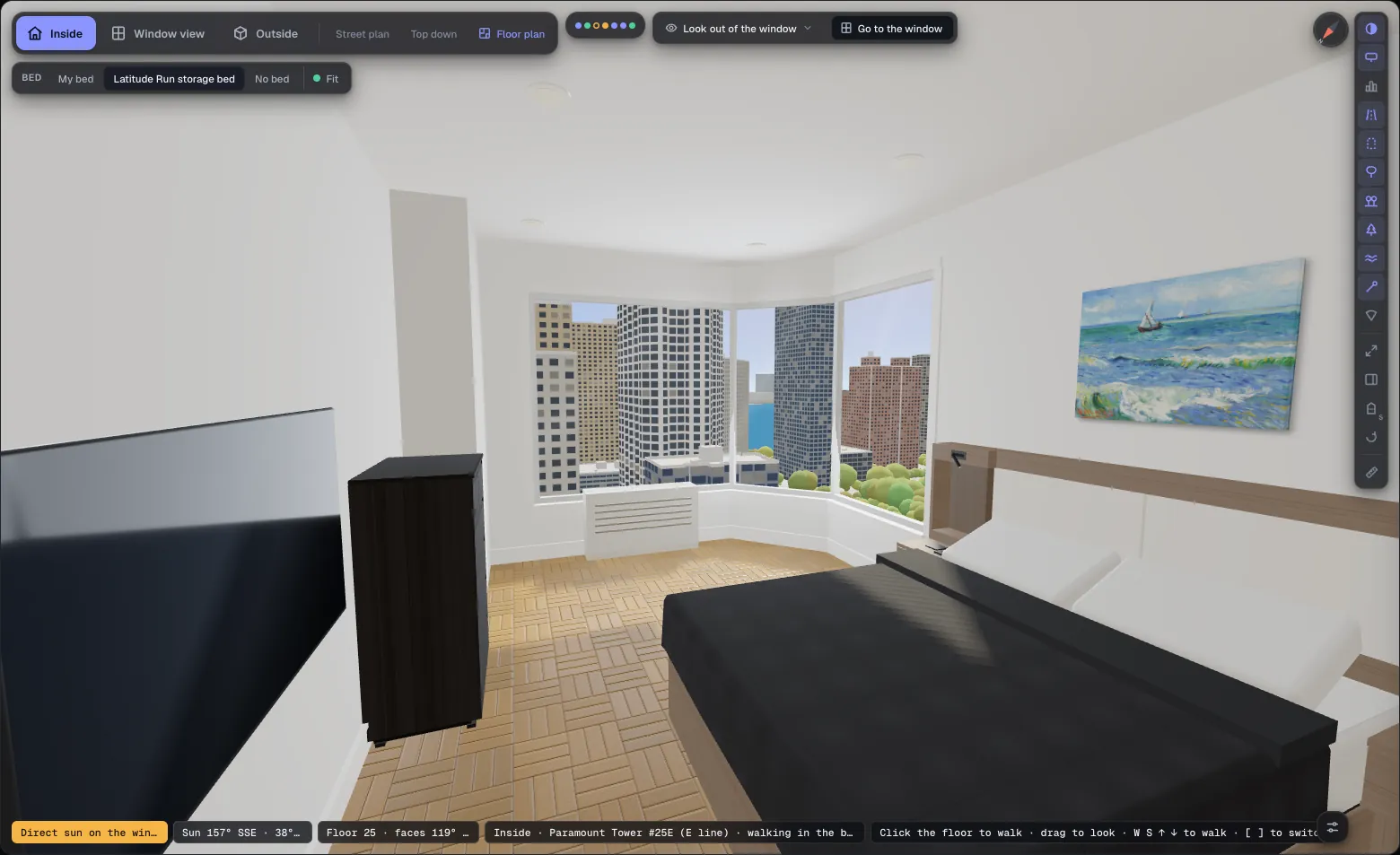
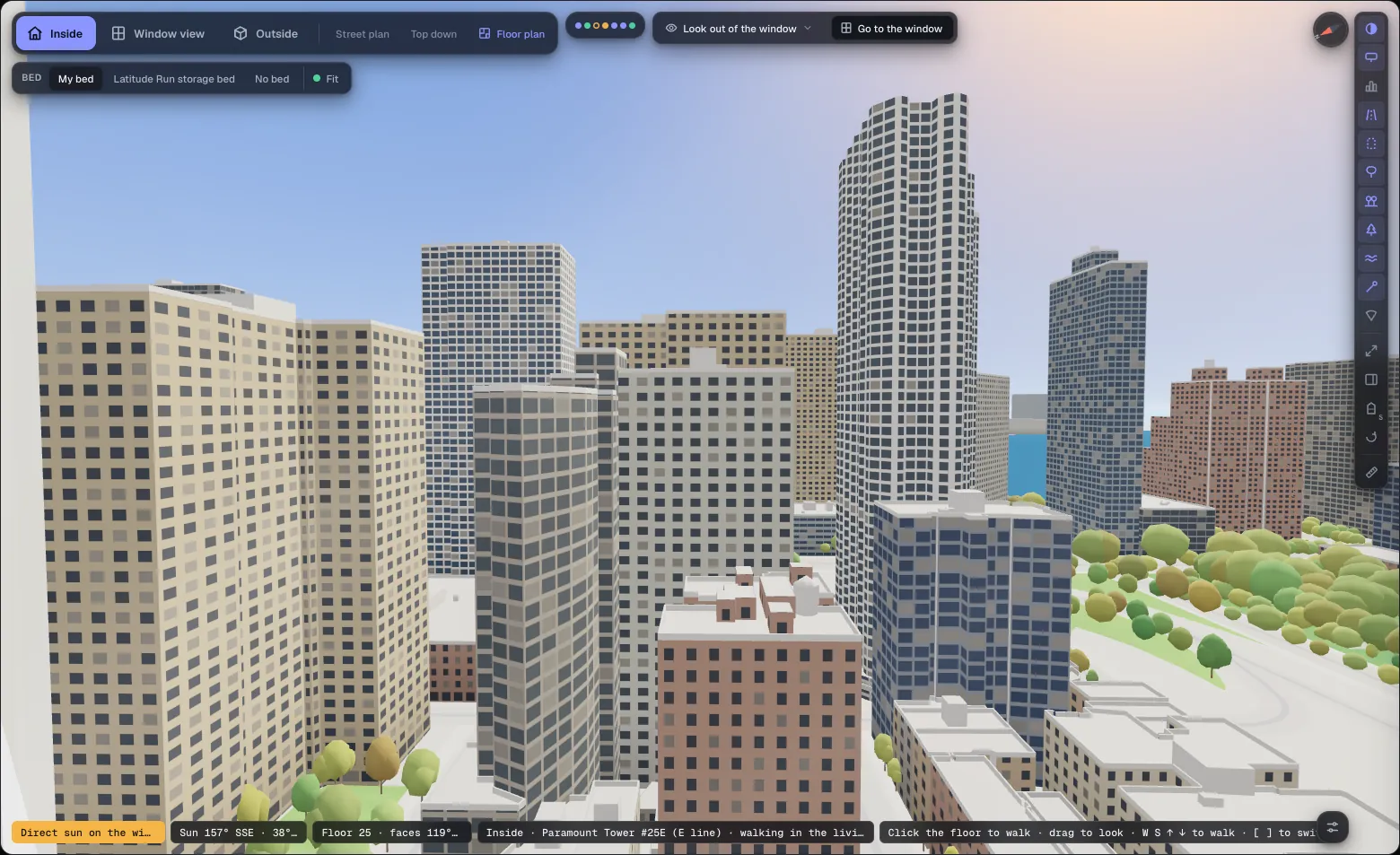
The 3D tab opens inside the unit at the real floor height and bearing, in the real city. The room holds the furniture you actually own, its floor and walls are read from the listing's photos, and the window shows what is outside: neighbouring towers, trees, a park, the river. Click the floor to walk, or go to the window; then play the day or the year and watch the sun and the seasons move.

  • A measuring tape, “Does it fit?” for any piece you might buy, and match-a-photo to test the model against a listing photo
  • The city at night with lit windows; towers that are filed or rising drawn where they will stand
  • A “what's measured vs assumed” chip says what the picture rests on
Open the 3D tab
Inside the living room: a black leather futon, a wall-mounted TV, a desk with a monitor and a task chair, and a basket-weave parquet floor.
Standing at the living-room window on the 25th floor, looking out over neighbouring towers, a park and the river.

4 · Decide

Tour day on your phone, questions for the office.

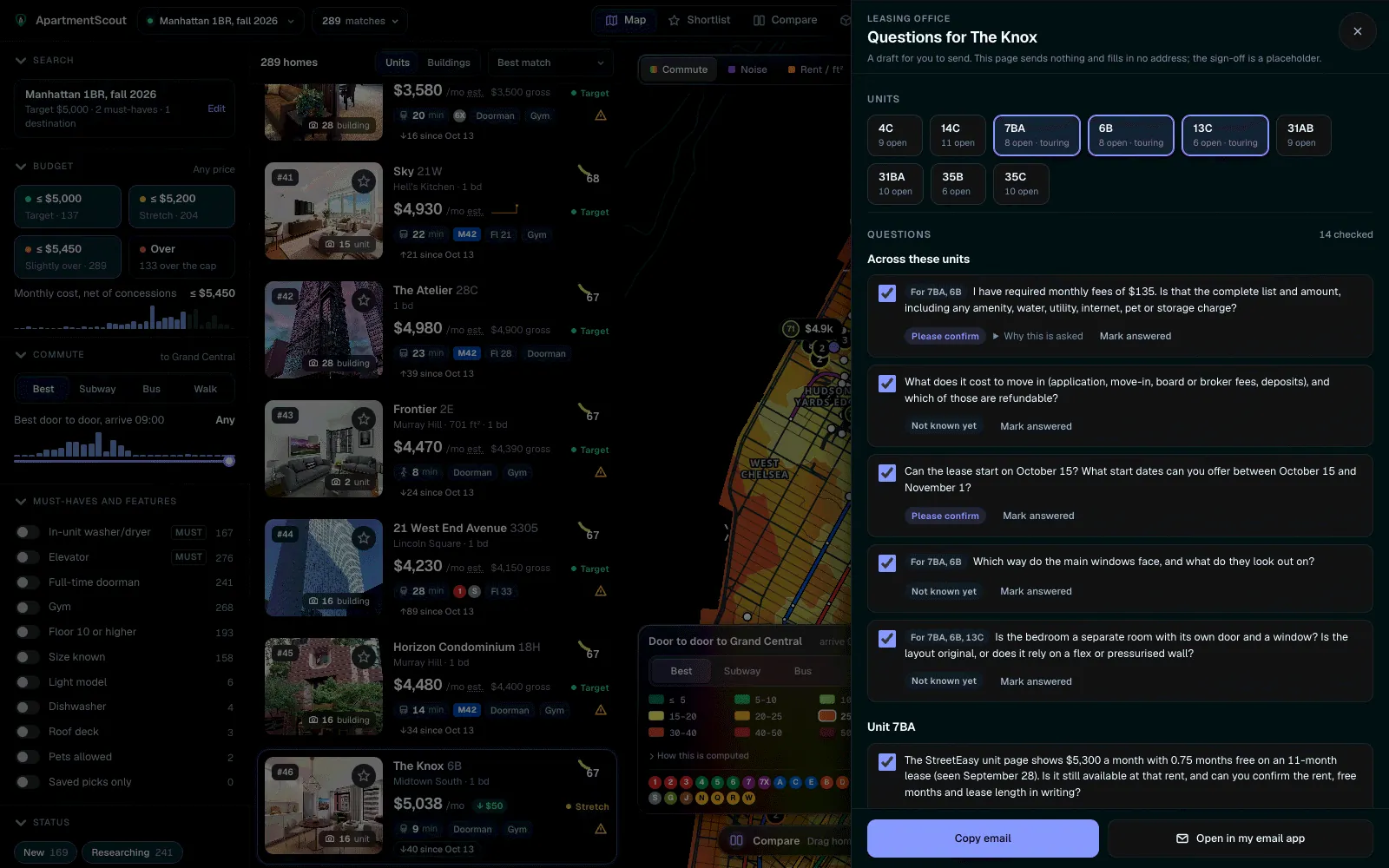
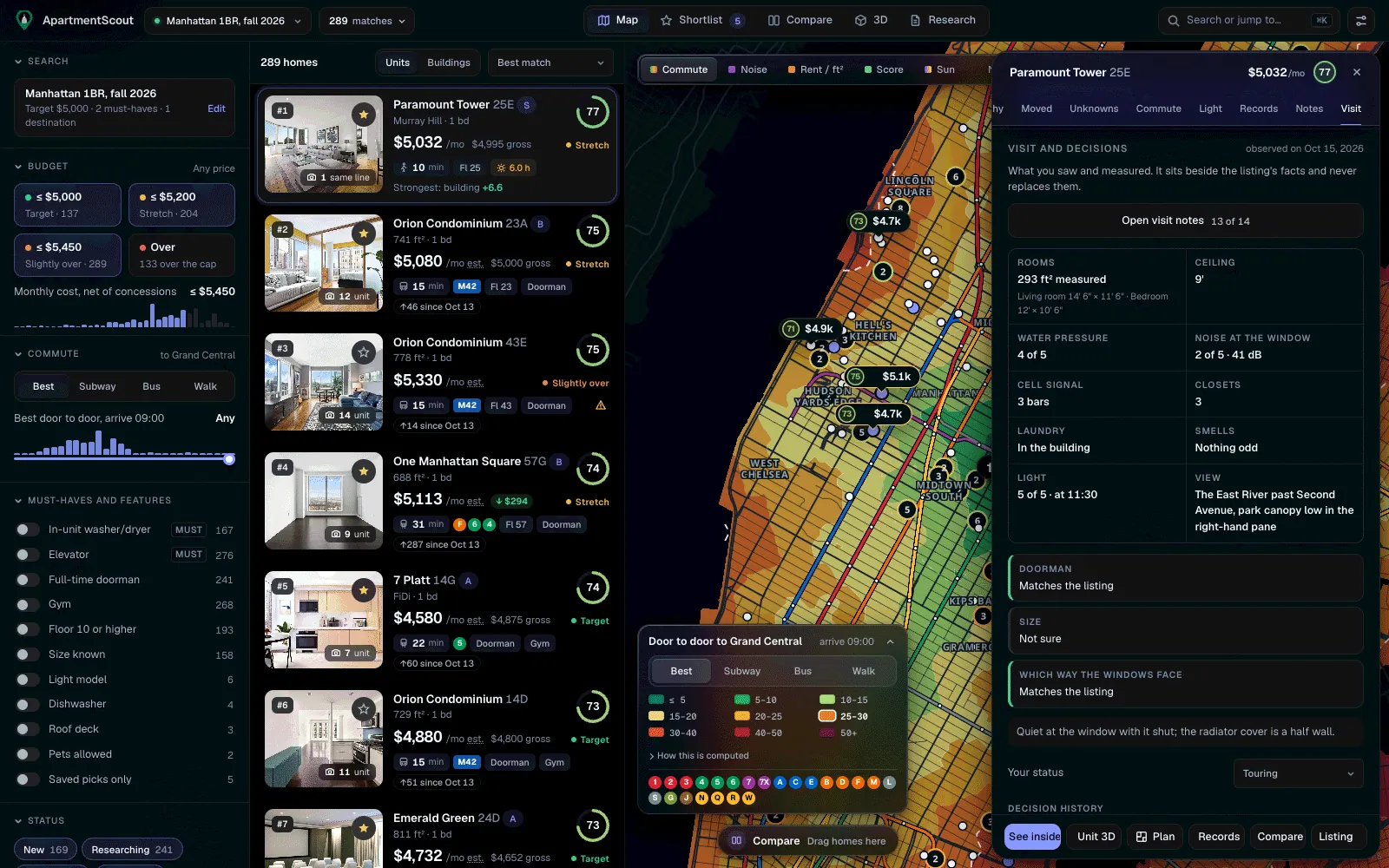
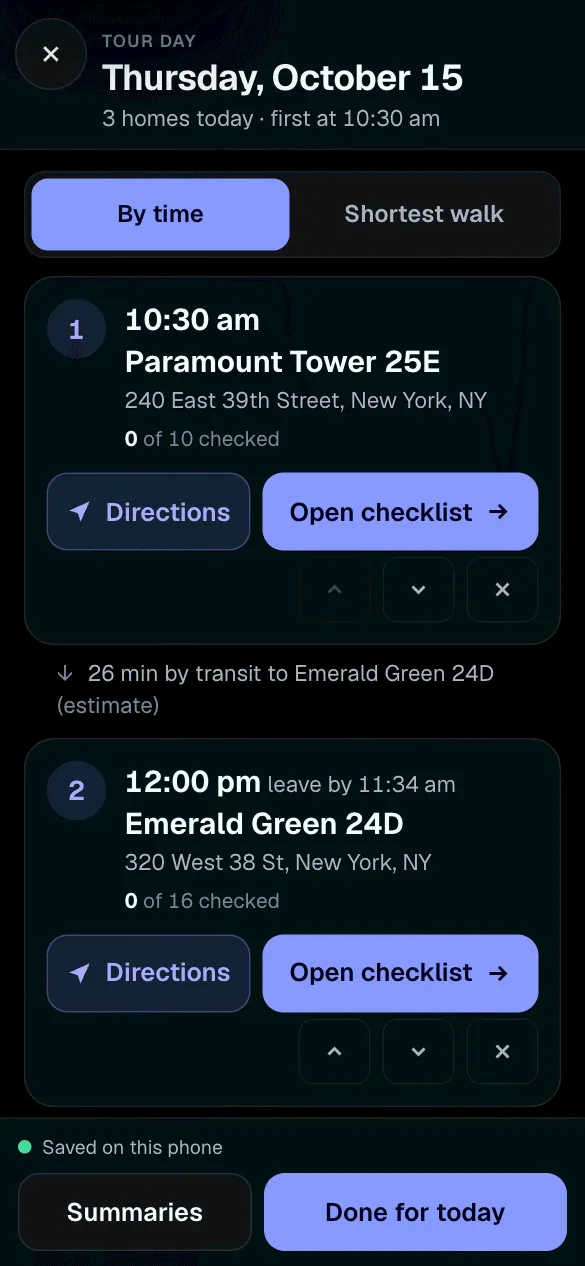
On the day, Tour day is a full-screen mode for one hand: today's tours in order with directions and leave-by times, a checklist at each home, and a noise check that keeps one number and no audio. Before and after, the dashboard drafts the questions your score is unsure about for the leasing office: copy them or open your mail app, and nothing is sent from the page. Then share a read-only page or a printable memo.

  • Visit notes sit beside the listing's facts and never overwrite them
  • Every star, tier and status change dated, with an optional reason
  • Your notes stay out of a shared page unless you tick them
Plan a tour day
Questions for a building's leasing office: a checklist of questions, why each is asked, and Copy email and Open in my email app.
Visit notes in a listing's drawer: measured rooms, water pressure, noise, signal and the listing's claims checked.

5 · Set up

Start your own search, in any city.

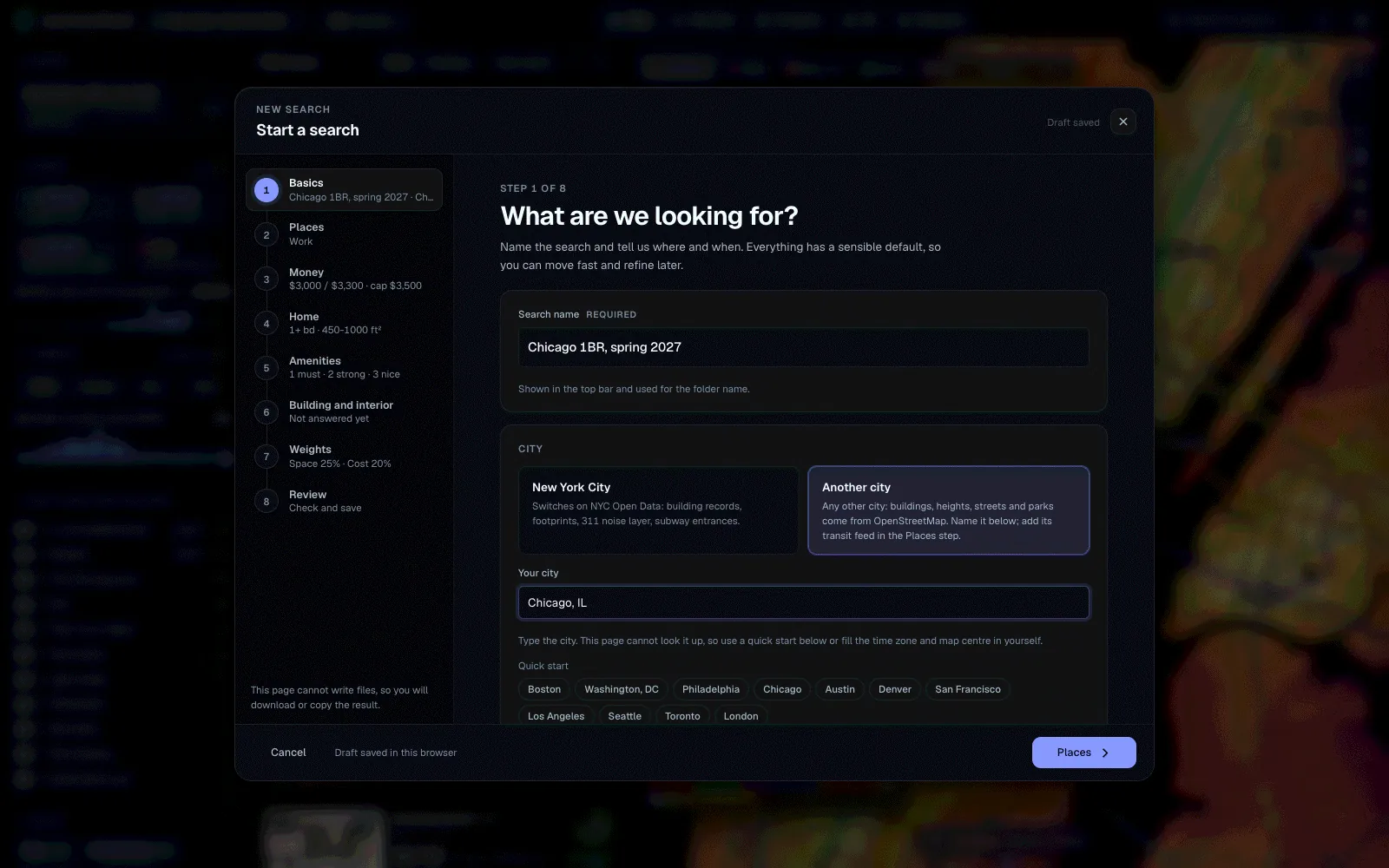
Eight short steps ask what an agent would ask: the city (looked up when you run it locally, so the time zone and the map are right), the places you travel to, the transit timetable, your budget and what matters most. The terminal and your agent ask the same questions, and all three write the same criteria.yaml. Everything personal then sits in one menu, and the dashboard installs as an app that keeps working offline.

  • Any city OpenStreetMap knows; New York also gets the city's open data
  • A review step with the finished criteria.yaml and a diff against the open search
  • Light, dark or follow the system; high contrast, reduced motion and larger text; ⌘K jumps anywhere
Try the wizard
The new search wizard on its first step, with Another city chosen and Chicago typed in.
The one menu at the top right: this search, data, appearance, comfort and help.

Live demo

Try it on a real search.

738 Manhattan listings, scored, mapped and researched, running in your browser. Add it to your home screen or dock and it keeps working offline.

Features

Everything a careful renter checks,
for every listing at once.

It came out of a real Manhattan search. The questions were the same for every finalist, so the answers became tools. In the order a search goes: find, compare, see inside, decide.

Find · Commute by mode

Walk, subway or bus. Every minute, door to door.

A built-in router turns any city's GTFS feeds into door-to-door minutes by walking, subway, bus and the best of transit, with transfers, for every listing and on a 150 m grid. Checked against an independent router on 208 buildings, it lands within a minute on average.

  • A range across departures, not one lucky train
  • Leg by leg: walk distance, board and alight times, transfers
  • Commute bands, 311 noise, rent, score and sun layers
Explore the map
Door-to-door commute bands over Manhattan with scored price tags, a filter rail and ranked listing cards.
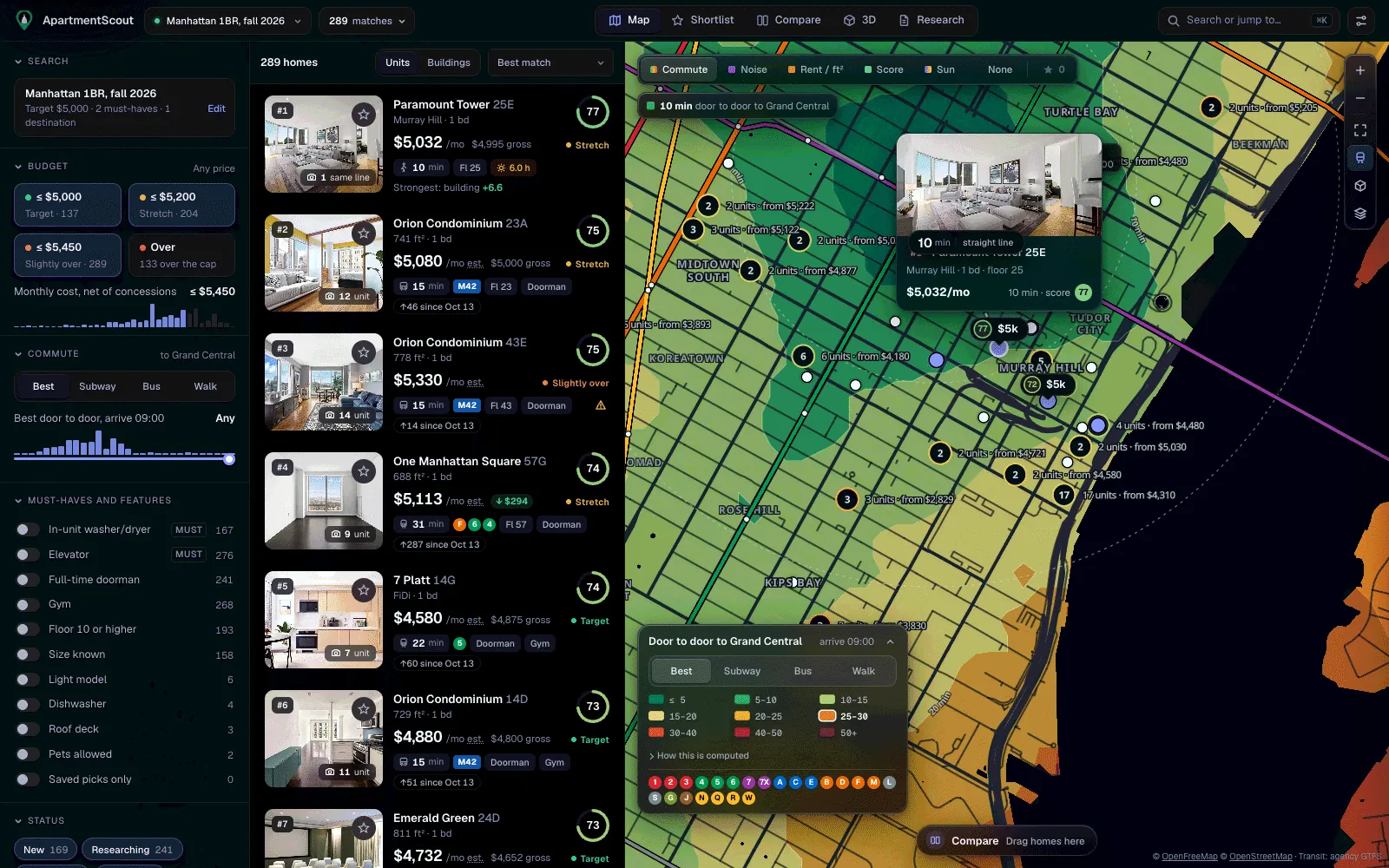
Hovering a pin on the map previews the home with its photo, rank, price and score without opening it.

Compare · Your criteria, honest money

Your weights. The real monthly cost.

Pick a weight preset, then drag any weight or the one dot on the trade-off pad: every card, pin and rank updates as you drag, with the reasons in plain sentences. Budget tiers judge the first-lease monthly cost after free months and fees, and a fee nobody has confirmed stays unknown instead of becoming $0. Where a home's score rests on a guess, the drawer lists the unknowns and what each could swing.
  • Point at a preset to see how the top ten would re-order before you apply it
  • Disputed prices become scenarios, ranked on the cautious one
  • Type the real size or fee and the home re-ranks at once
Open the shortlist
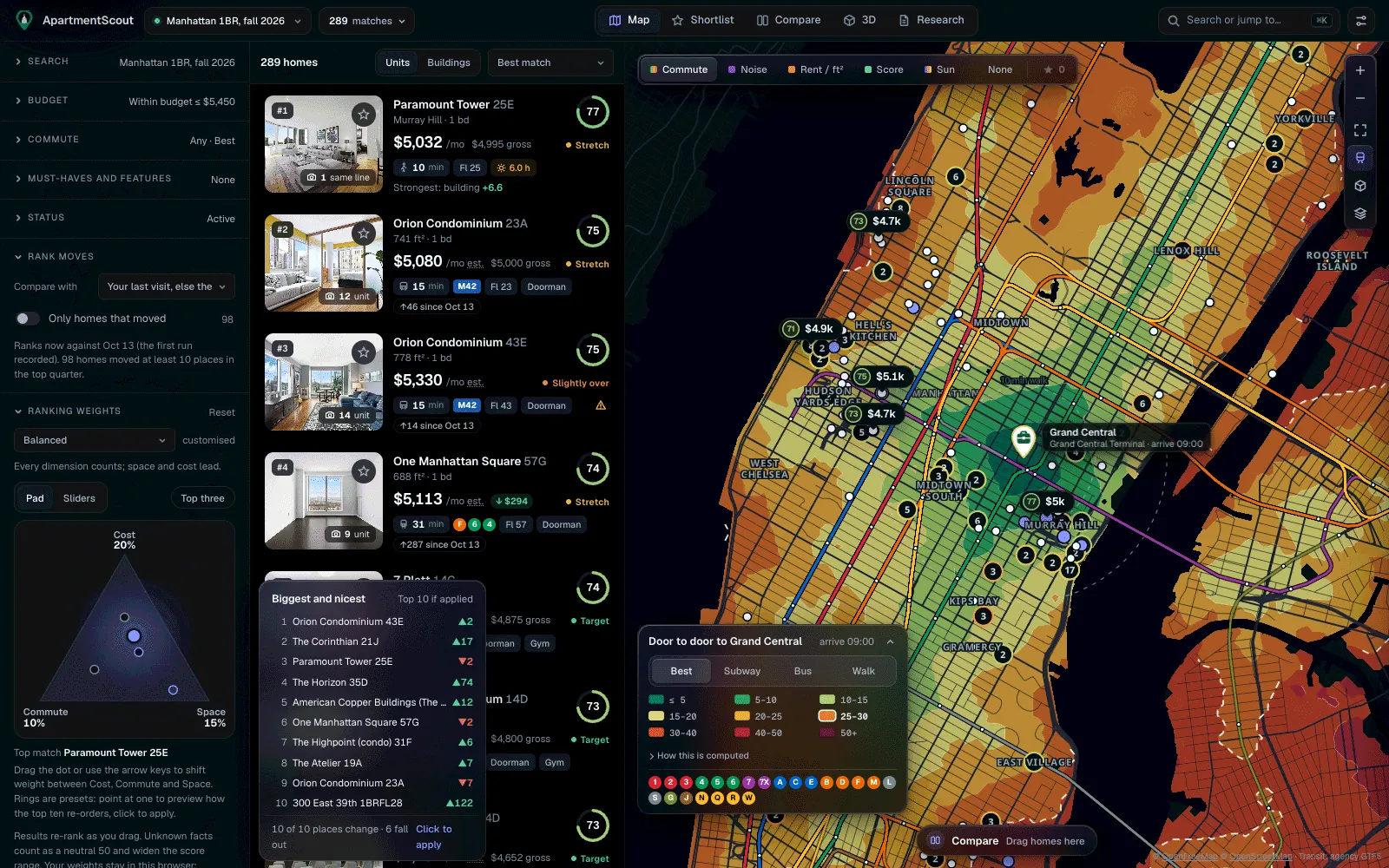
The trade-off pad in the rail with a preset previewed: the top ten as it would re-order, with the places that change marked.
Unknowns that move this score: typing an 800 square-foot size shows the score and rank the home would get.

See inside · Light & view in 3D

Will the window see the sky or a wall?

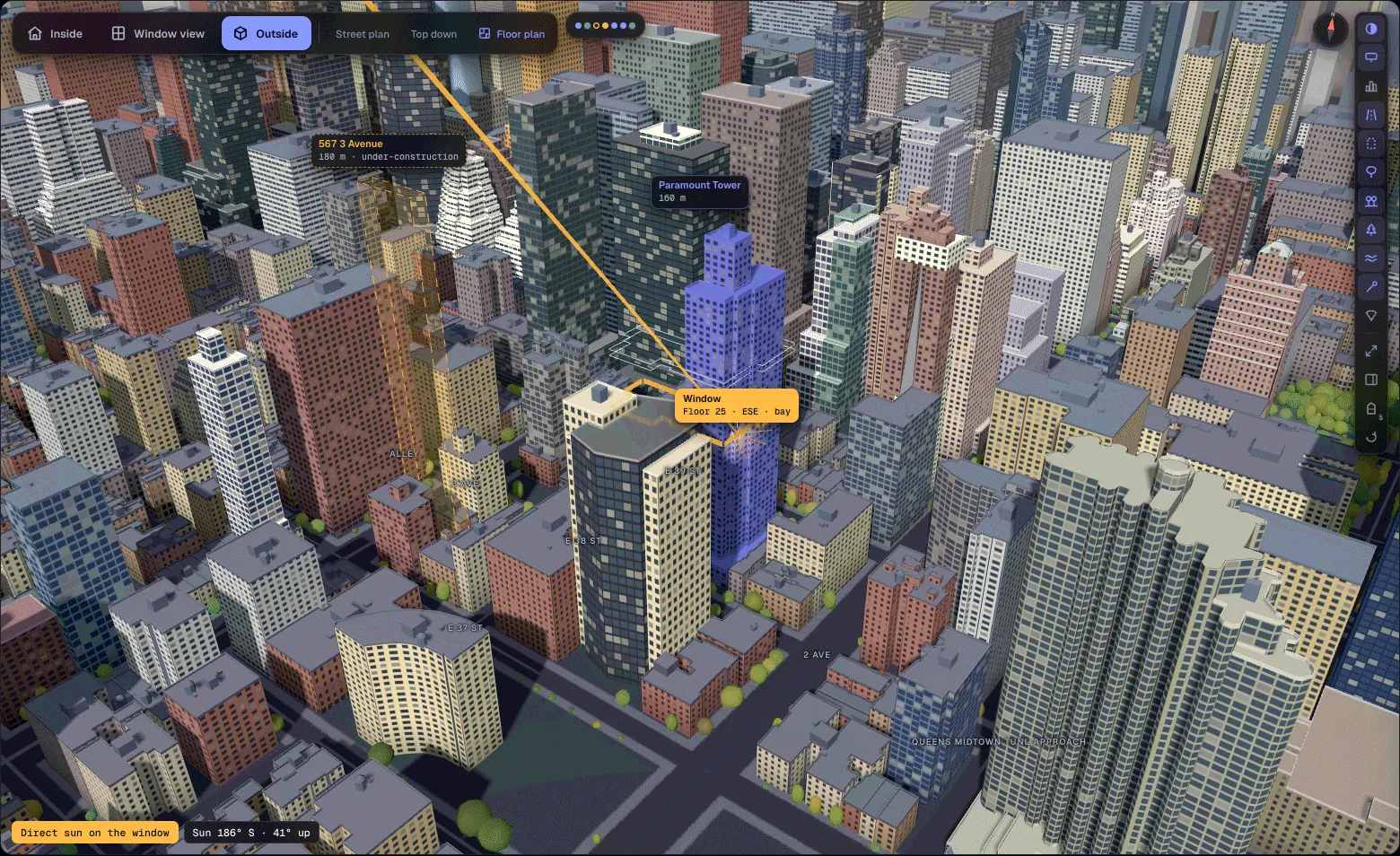
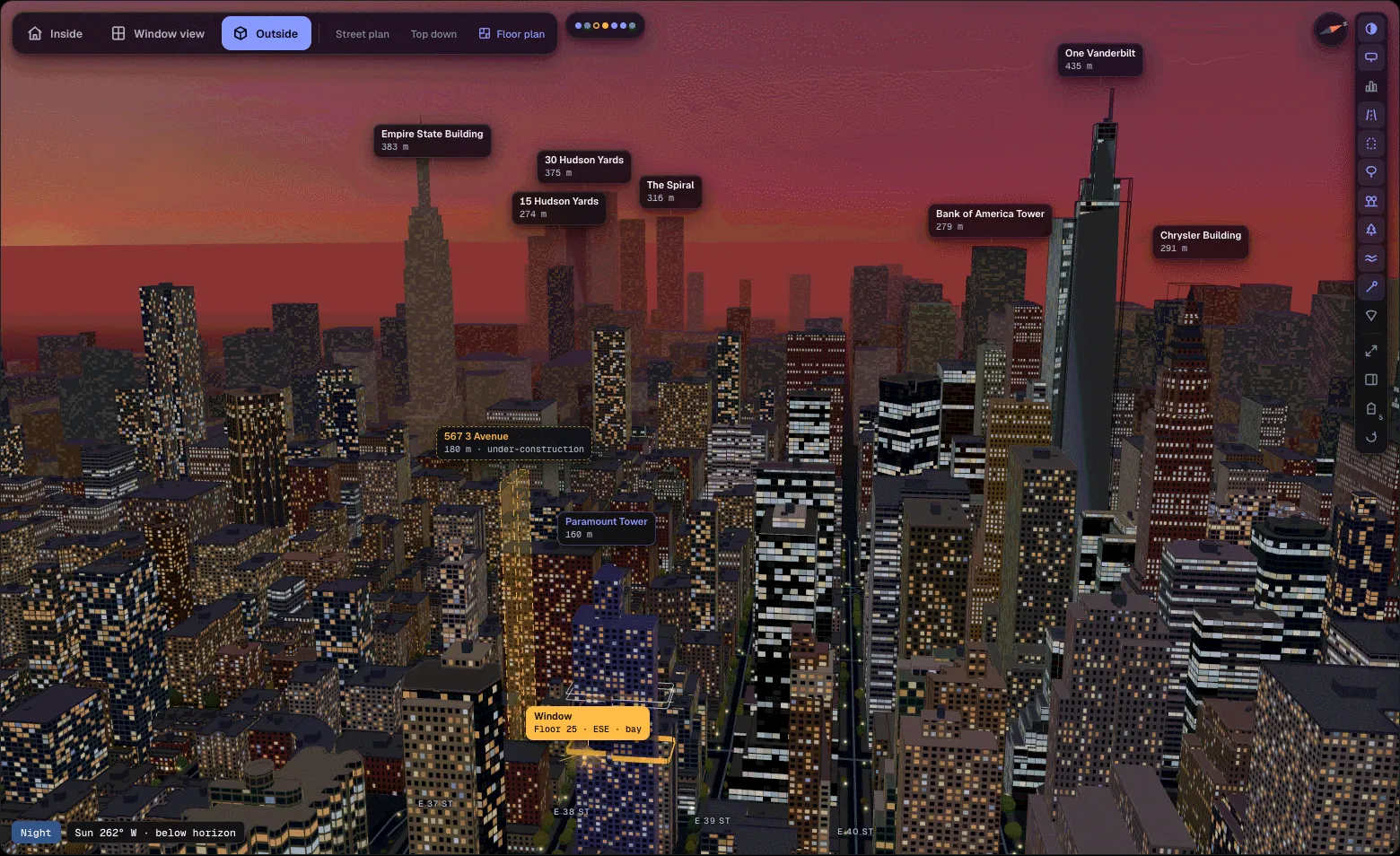
Real footprints and heights around the unit, sun and shadows for any date and time, a natural sky, and the view from the window. Facades carry lit windows at night, the Empire State and Chrysler Buildings are drawn from their parts, and street and park trees, grass and water are in the picture as context, changing with the season. The day strip names the building that shades the window.

  • Direct-sun hours for every floor and month; play the day or the year
  • Towers that are filed or rising drawn where they will stand
  • Exposure worked out from listing photos and video
Open Unit 3D
Unit 3D by day: the tower among its real neighbours with the window marked, a sun ray, a tower under construction drawn dashed and street trees.
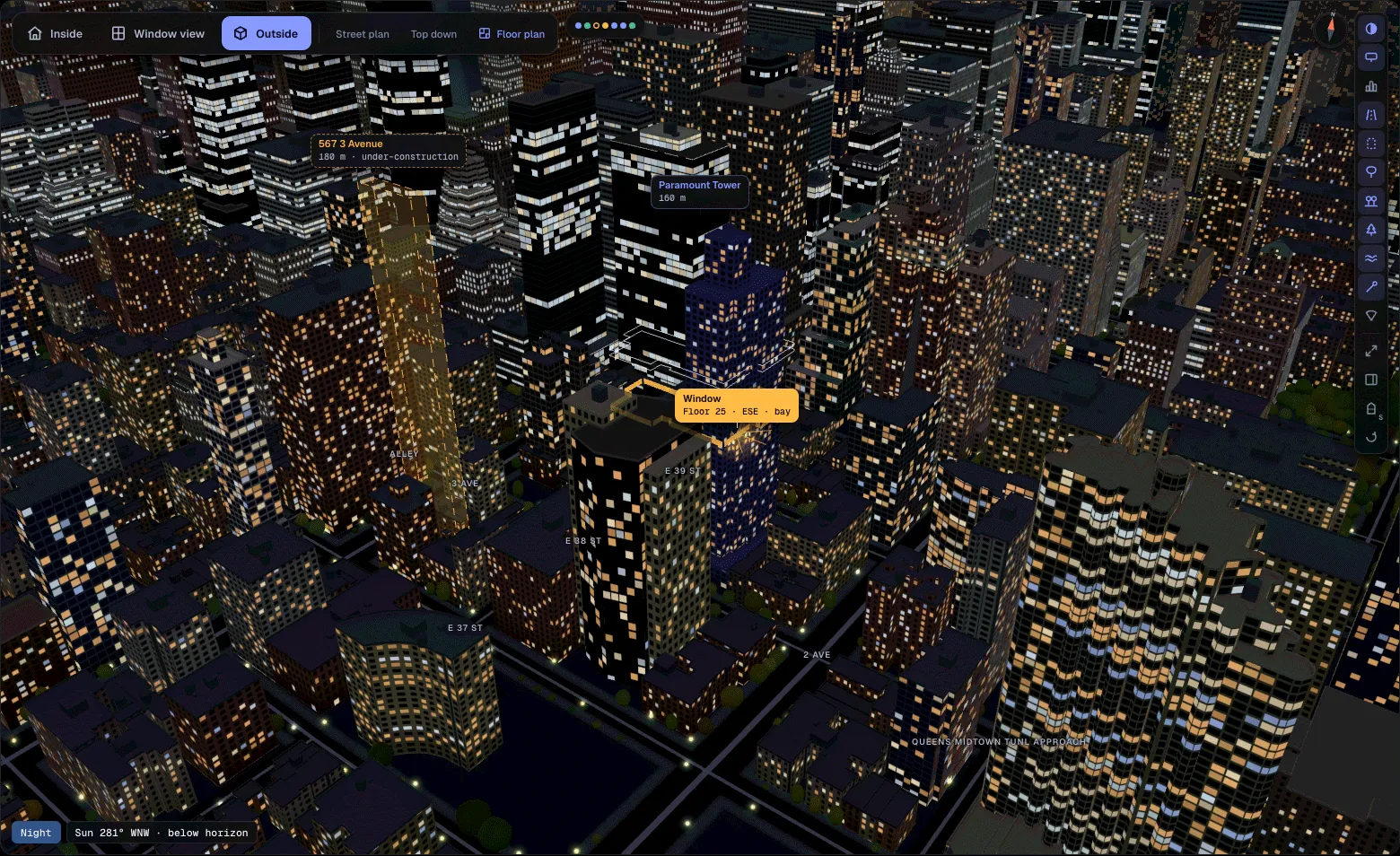
The same view at night: facades with lit windows and street lamps around the tower.

See inside · Floor-plan studio

Move in before you move in.

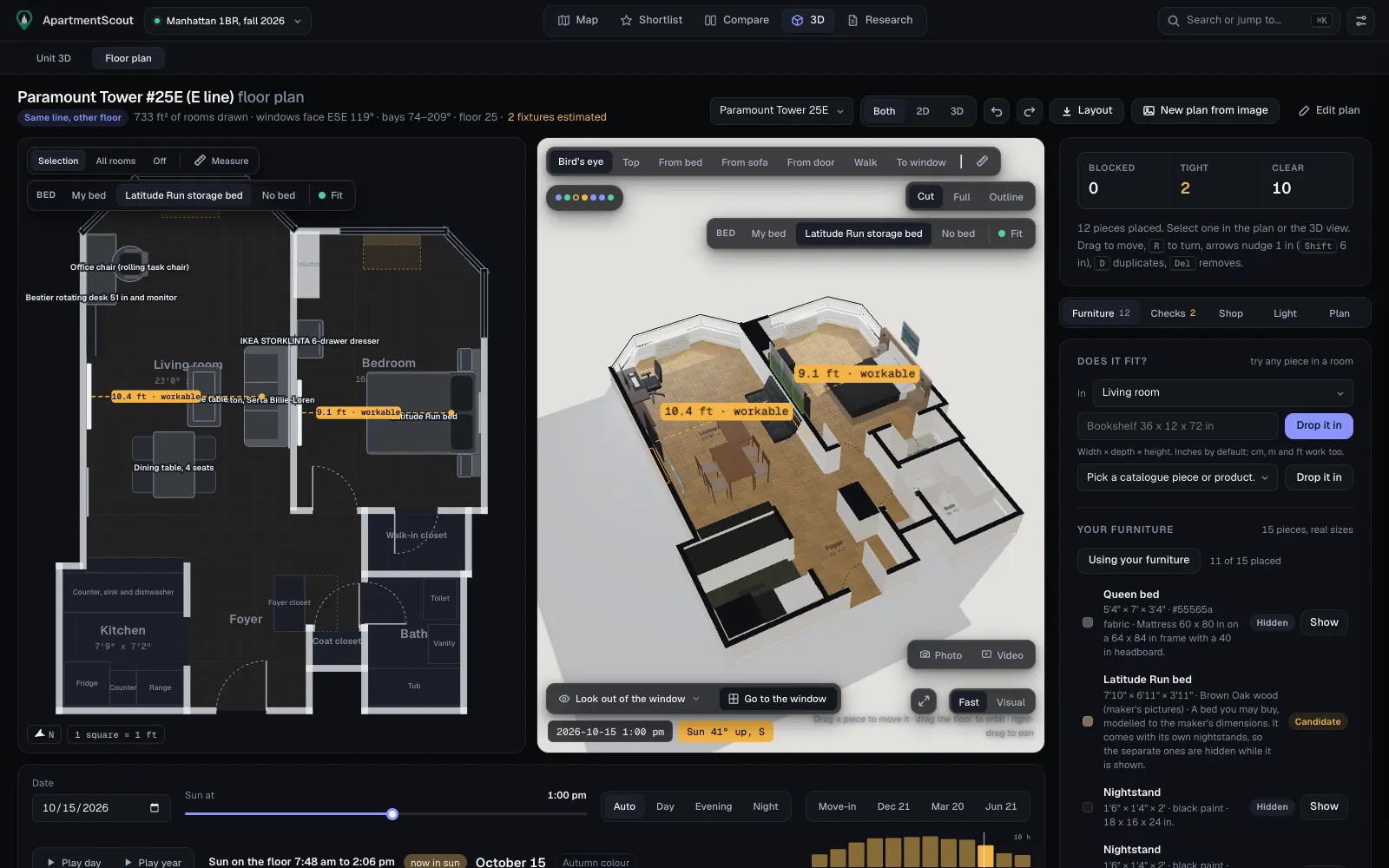
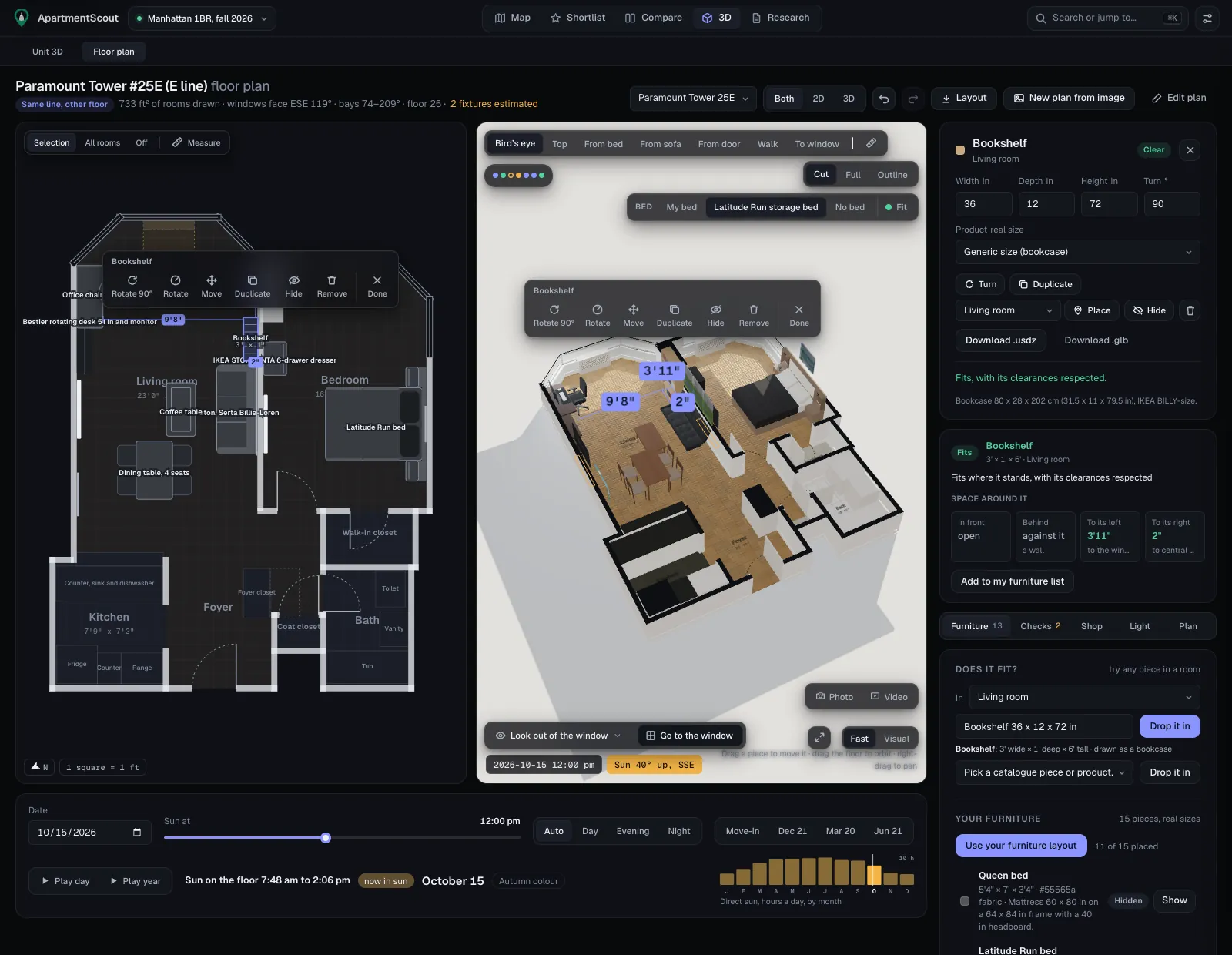
A plan becomes a 2D plan and a 3D room side by side. Place the furniture you own, at its real size and colour, or pick from a cited catalogue, and every piece is checked against walls, door swings and clearances. “Does it fit?” takes any piece you might buy, by name or by size, and says what is in the way.

  • Fit graded clear, tight or blocked; TV distance per seat
  • A piece you placed stays where you put it, in the studio and in Unit 3D
  • PNG and GLB export, with the assumptions
Open the floor plan
Floor-plan studio: a one-bedroom plan in 2D and 3D with furniture, ten pieces placed and all clear, and TV distances marked.
Does it fit? A 36 by 12 by 72 inch bookshelf dropped into the living room, with the space around it on each side.

See inside · Walk, measure, match

Test the picture against the real thing.

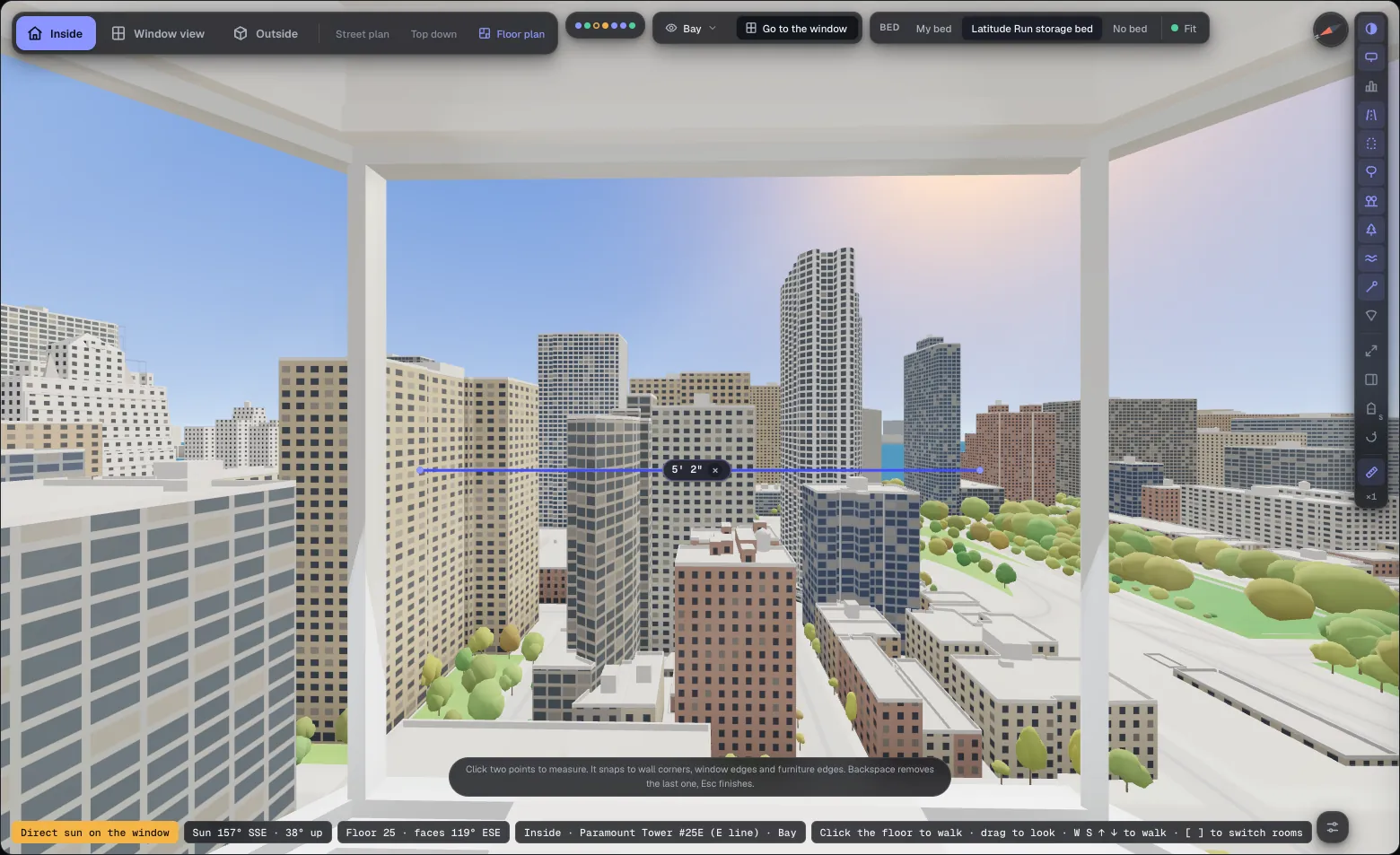
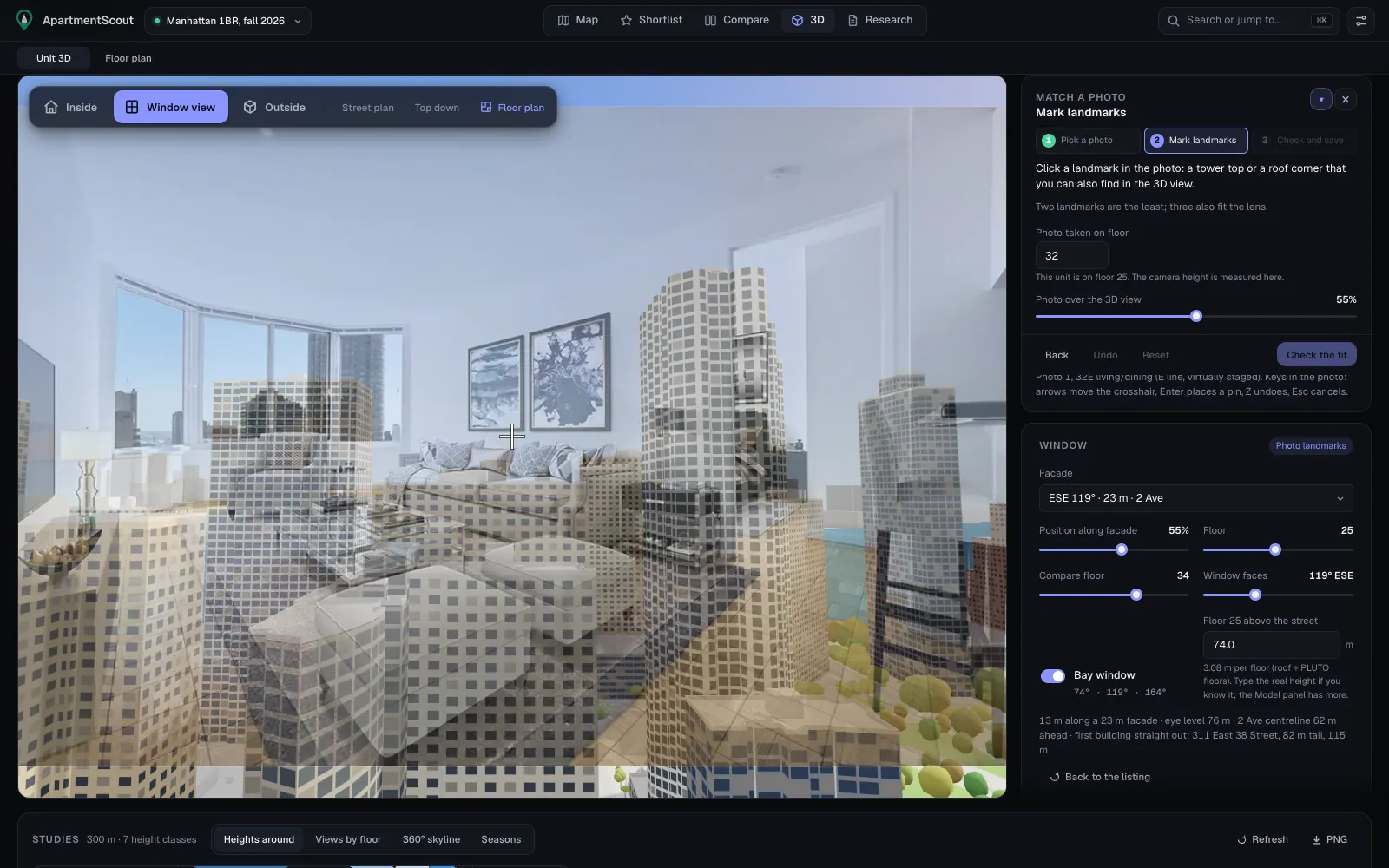
Walk the floor with a click and stand at the window; read a width off the glass with the measuring tape, which snaps to wall corners, window edges and furniture; or lay a listing photo over the 3D view and mark landmarks to check that the model's window, floor and bearing agree with what the photographer saw.

  • Walls, sills, furniture and glass stop you, as they would in the room
  • In the studio the readings survive a reload and show in the 2D plan and the 3D room alike
  • Match-a-photo fits the camera to your landmarks and saves the result in this browser
Walk the unit
The measuring tape reading 5 feet 2 inches across the living-room bay window.
Match a photo: a listing photo laid over the 3D view while landmarks are marked.

Decide · Research quality

Know what you still don't know.

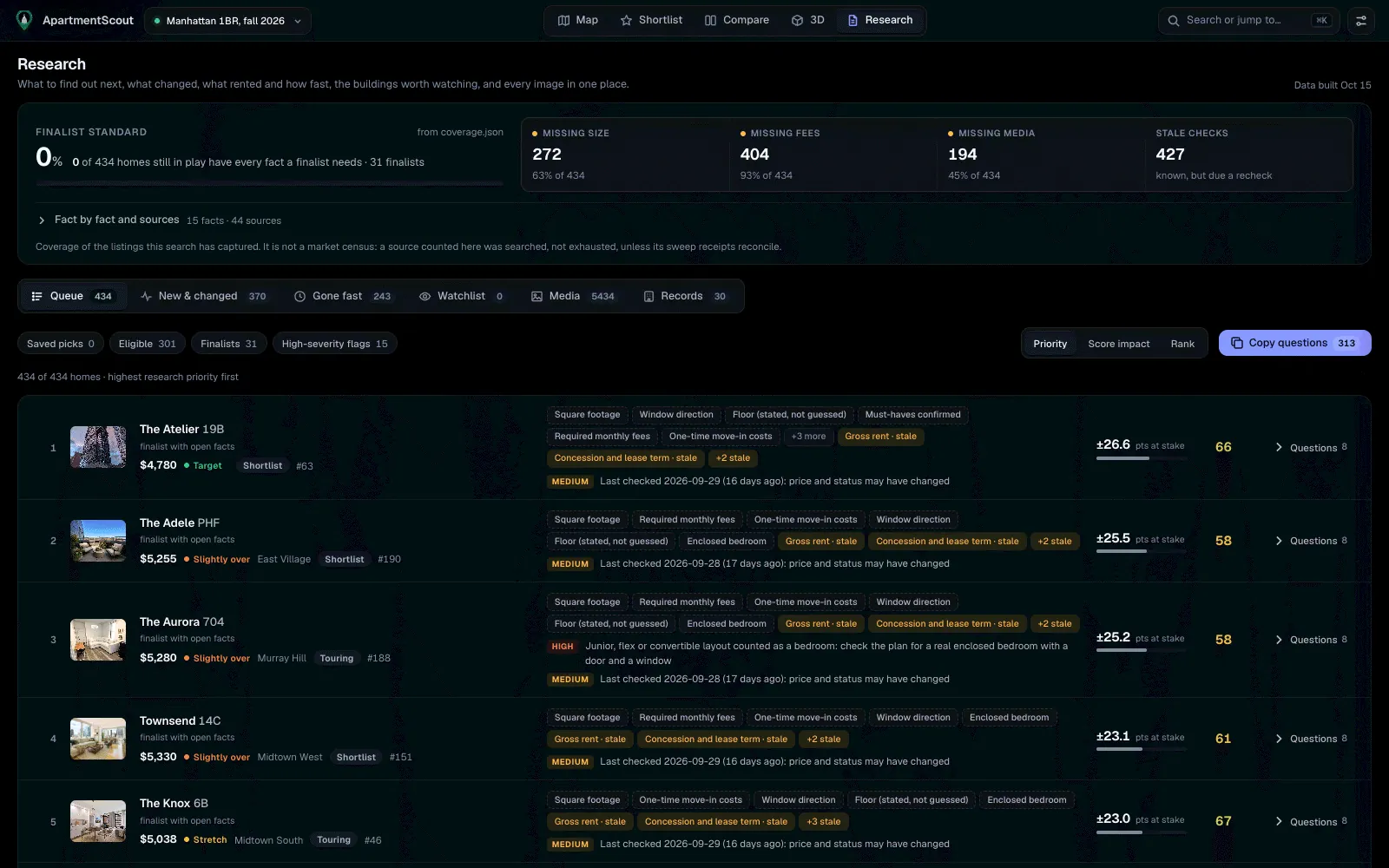
Before you spend a visit, the CLI checks the data and the listing. validate catches bad rows, lint flags 14 listing traps, and coverage measures every listing against a 15-fact finalist standard, with the points each gap could swing. The leasing-office drafts ask for exactly what is missing.

  • Junior 1BRs, building laundry sold as in-unit, fees passed off as price drops
  • A research queue with questions ready to send
  • History of every claim, what rented fast, a building watchlist
Open the research queue
Research view: the finalist standard, counts of missing size, fees and media, and a queue of listings with their missing and stale facts and points at stake.
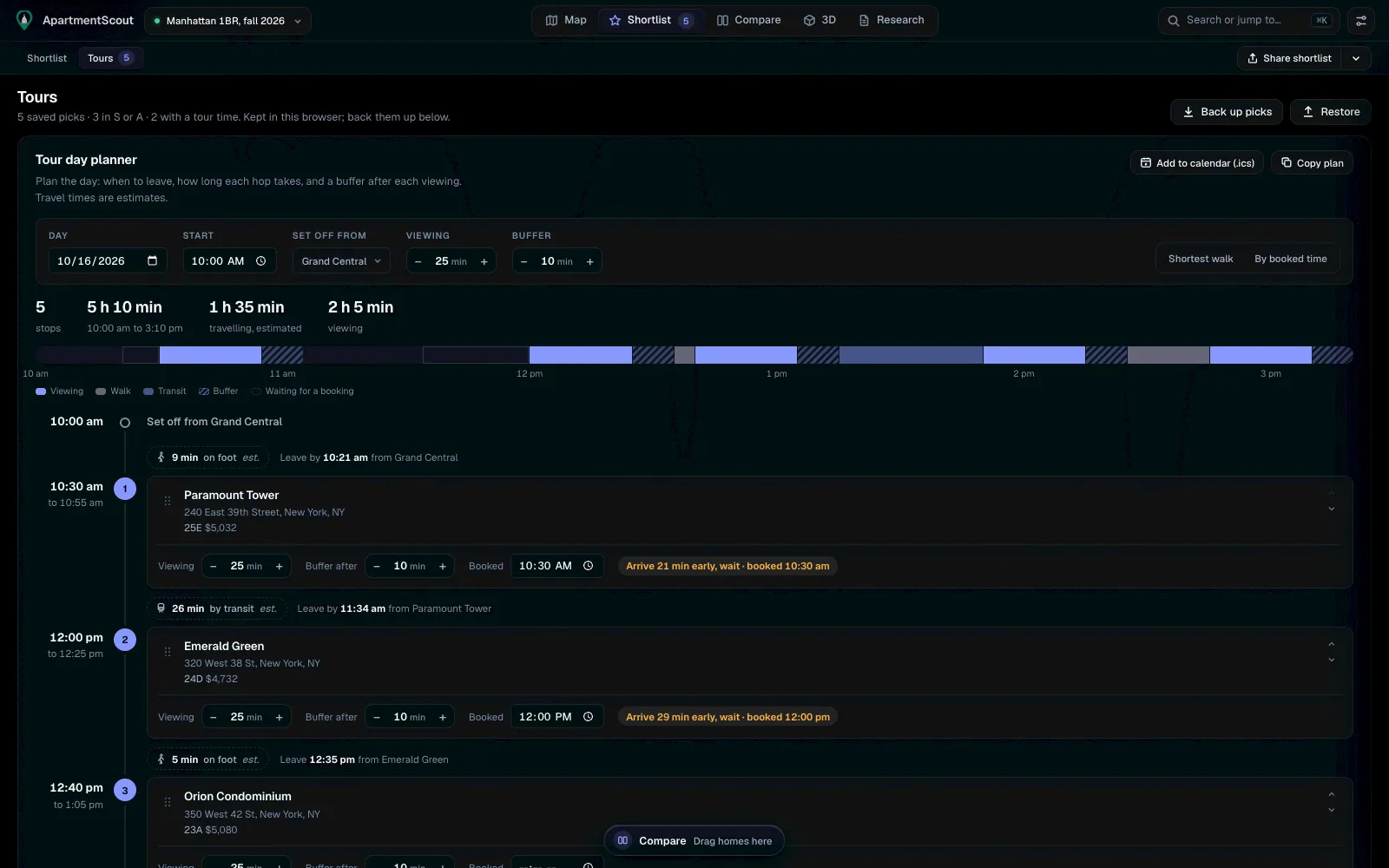
The tour-day planner: five stops with leave-by times, viewing times and buffers.

Decide · Building records

Read the building before the lease.

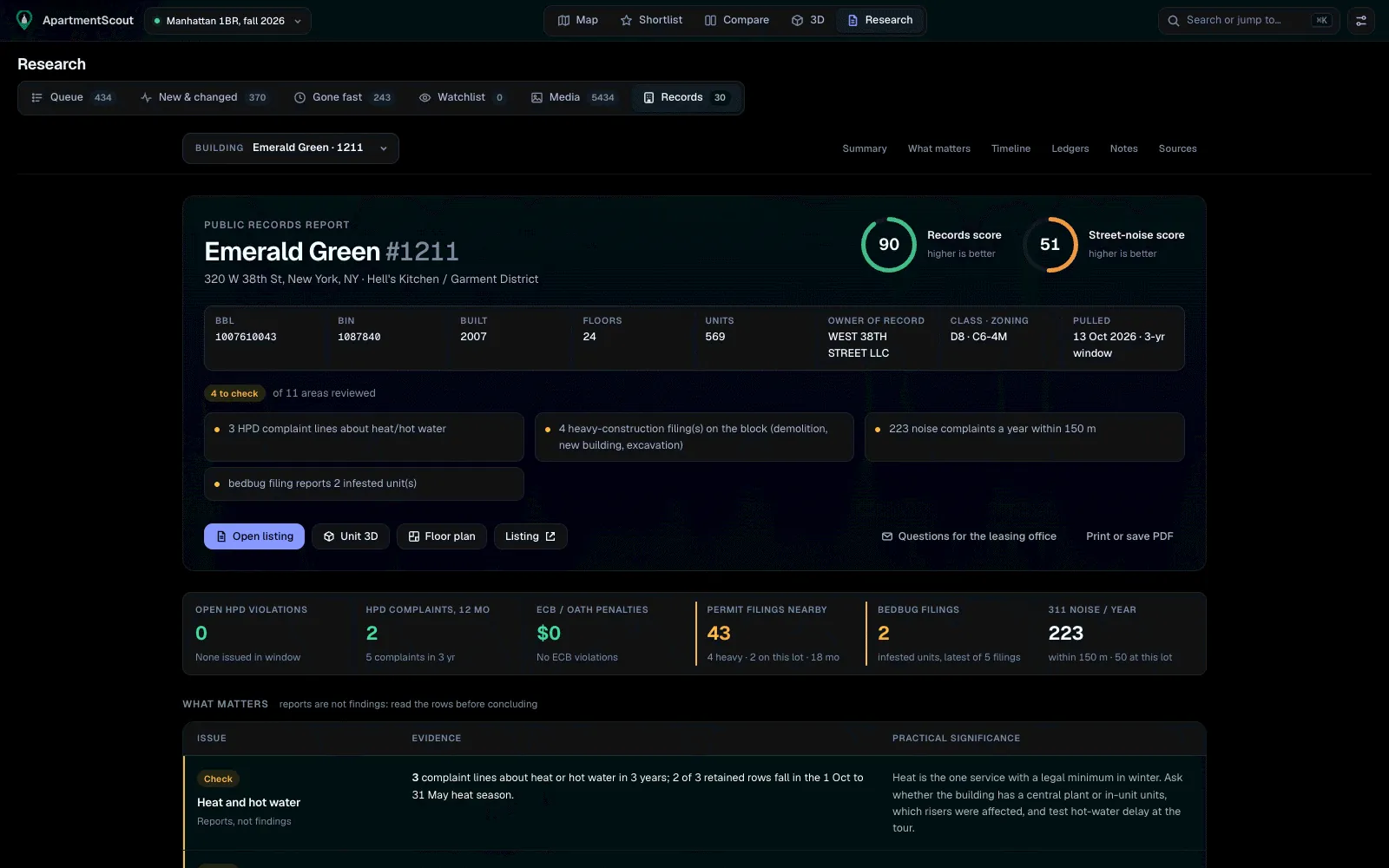
One command pulls the city's records for your shortlist: HPD violations and complaints, DOB and ECB filings, permits on the block, bedbug reports, 311 noise and nearby crime. The report leads with what matters, the evidence and what it means in practice.

  • Reports labelled as reports, findings as findings
  • Timelines, 311 by hour and ledgers linked to the raw rows
  • Resident reviews and research notes alongside
Read a dossier
Public records report for a building: a records score and a street-noise score, four areas to check, metric tiles and the start of the What matters table.
  • Licensed building photos

    photos finds Wikimedia Commons photos of each building under strict rules and keeps the author and licence with every image.

  • A spreadsheet that ranks

    export --xlsx writes a workbook whose weights drive live score and rank formulas, plus outreach and to-verify sheets.

  • Agent handoff packs

    Checksummed packs move a search between agents. Imports append claims and keep every conflict; nothing is silently overwritten.

  • One file, yours to keep

    Serve it locally, host it on GitHub Pages, build one self-contained HTML file or install it as an app. No accounts, servers or API keys.

Bring your own agent

Ask in plain language. The playbooks do the rest.

Open the repo in Claude Code, Codex, Cursor or any agent that reads AGENTS.md. It interviews you for what is missing, writes your criteria and works through nine stage-by-stage skills, checking its own data with validate, lint and coverage as it goes. Plain Markdown, so any agent can follow them.

  • apartment-searchIntake, scoring and the shortlist
  • listing-sourcingPortals, brokers and building sites, de-duplicated
  • commute-analysisWalk, subway, bus and best, checked live
  • building-dossierPublic records, owners and reviews
  • noise-deep-dive311 by hour and side, a night-visit plan
  • unit-light-and-viewExposure, sun hours and the skyline
  • floor-plan-modelA listing plan to 3D, with furniture fit
  • lease-and-feesNet-effective rent, fees and break terms
  • tour-and-decideTours, comparison and a decision memo

YouI'm moving to Chicago in March. Find me a one-bedroom with in-unit laundry under $2,600 within 30 minutes of the Loop by train, and tell me which buildings have problems.

  1. Read AGENTS.md and asked about move-in date, fees and must-haves
  2. Wrote criteria.yaml with budget tiers, the Loop commute and your weights
  3. listing-sourcing swept portals and building sites into listings.json
  4. Ran validate and lint: two "one-bedrooms" were junior 1BRs
  5. Ran apartmentscout all: geocode, CTA commute by mode, score, dashboard
  6. building-dossier pulling records and reviews for the shortlist

Drafts messages to leasing offices. Never sends them for you.

An illustrative session: the renter's request, then the stages the agent works through.

Under the hood

Plain files in, a dashboard out.

Every stage is a CLI command over files in your search folder, so you, your agent or a spreadsheet can step in anywhere.

ApartmentScout pipeline Listings are geocoded, then fan out to the commute router (walk, subway, bus), building records and photos, and the 3D site model. Those results, the lint checks and your criteria feed the score, which builds the dashboard. Criteriacriteria.yaml Listingsimport · agent GeocodeBBL · BIN · lat/lon Commutewalk · subway · bus Recordsdossier · photos Light & viewsite · sun model Scorelint · your weights Dashboard5 tabs · one file
  1. 01Criteriacriteria.yaml

    Budget tiers, must-haves, commute limits and weights.

  2. 02Listingsimport

    CSV, JSON or your agent, each fact with a source, then validated and linted.

  3. 03Geocodegeocode

    Coordinates, plus BBL and BIN in New York.

  4. 04Commutecommute

    Walk, subway, bus and best of transit, door to door.

  5. 05Recordsdossier

    City records, reviews and licensed building photos.

  6. 06Sitesite

    Footprints, heights, sun hours and the view.

  7. 07Scorescore

    Ranked on your weights; coverage shows what is still unknown.

  8. 08Dashboardbuild

    Five tabs you serve, host on Pages or open as one file.

Quick start

Running in a minute.

Clone, install and open the worked example. Then start your own search in any city with a GTFS feed.

  • Python 3.10 or newer
  • Commute by mode anywhere with a GTFS feed
  • No API keys, accounts or servers
  • Building-records automation for New York; a short module adds a city
Try the worked example
git clone --depth 1 https://github.com/0marm0/ApartmentScout.git
cd ApartmentScout
pip install -e .
apartmentscout serve --search examples/nyc-2026
Start your own search
apartmentscout init searches/my-search --city "Chicago, IL" --interactive
export APARTMENTSCOUT_SEARCH=searches/my-search
apartmentscout import searches/my-search/listings.csv
apartmentscout validate && apartmentscout lint
apartmentscout all           # geocode, commute, layers, places, score, build
apartmentscout surroundings  # the buildings around each home (3D, sun, view)
apartmentscout plans         # floor plans: which homes have one
apartmentscout serve
Take it with you
apartmentscout build --standalone my-search.html  # one file
apartmentscout export --xlsx my-search.xlsx       # live ranks
apartmentscout handoff pack out.zip --to codex    # to an agent

Privacy & responsible use

Your search stays yours.

  • Local by default

    Searches live in a git-ignored folder and serve from their own cache. Criteria, notes, picks and listing photos stay on your machine unless you publish them.

  • Respect for sites

    Agents use official APIs and open data, never solve CAPTCHAs or bypass bot checks, and ask before logging in anywhere.

  • Reports, not findings

    311 calls, complaints and reviews are allegations. They are counted, dated and labelled that way everywhere.

  • Estimates, checked in person

    Commute, sun and score numbers are models. Nothing is sent to a landlord without your say-so; verify the important ones on a visit.

See it on a real search.

738 Manhattan listings, scored, mapped and researched. Runs in your browser.